



Cost Centers Guide – Practical Steps & Templates
13.03 $
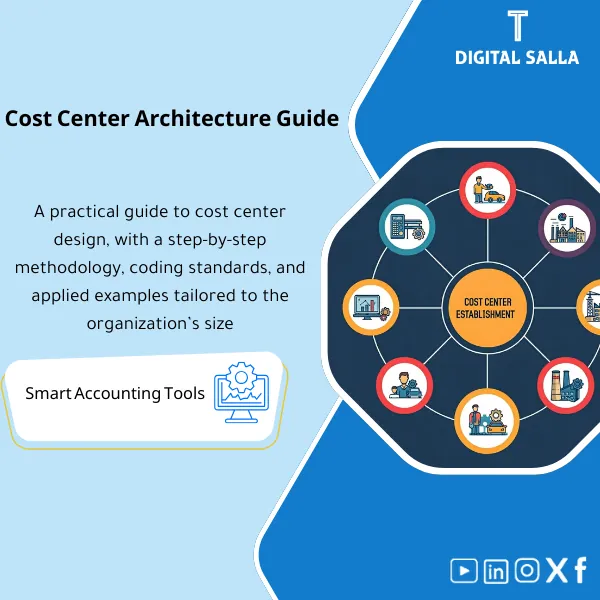
How to Design the Right Cost Center Structure: A practical guide for building an effective cost center directory—tailored to executive needs in large, complex organizations. Enhances cost control and supports better decision-making.
Cost Center
Practical Guide + Cost Center Tree Template + Expense Allocation Rules — to establish operationally viable Cost Centers within ERP and reporting
Value Proposition: If a Cost Center is established “by name” only, you will find yourself at the end of the month facing a correct TB but operational reports that are unusable: unallocated shared expenses, overlapping centers, and management requests like “What is the cost of the branch/department/product?” without a traceable answer. This product offers a method to establish a process from start to finish: selecting the appropriate Cost Center Tree structure, building a downloadable Cost Center Guide in the system, and defining the Expense Allocation Methodology for Cost Centers with guidelines (Allocation Basis + Decision Log + Sign-off).
In 20 seconds: What will you get?
- Clear Framework to define the type of Cost Center (Functional/Branch/Project/Product) without structural conflicts.
- Cost Center Guide Template (Cost Center Master): Code/Name/Parent/Status/Owner ready for system upload.
- Cost Center Tree (Hierarchy) with scalable levels: Group → Department → Branch/Project.
- Methodology for Expense Allocation to Cost Centers: Definition of shared expense + Driver + Basis + Timing of allocation.
- Cost Center Account Guide: Mapping that specifies which GL accounts are charged to which centers, and where posting controls are needed.
- Monthly reporting template: Cost Center P&L + Variances + Cost indicators for each Driver (e.g., Cost/Employee = Average Cost Calculation based on data).
- Pack of Guidelines: Decision Log + Change Log + Sign-off for the structure of centers and allocation rules.
CTA related to outputs: Receive Cost Center Guide + Tree + Expense Allocation Rules as a ready-to-approve and implement delivery pack.
Suitable for
- Financial Controller / Chief Accountant: Needs interpretable operational cost reports from the GL to departments/branches.
- ERP Finance Lead / Implementation: Wants to establish cost centers in the accounting system with an approved Master file instead of decisions during implementation.
- Companies with significant shared expenses: Need monthly allocation rules with Drivers and guidelines (Traceability) instead of random reconciliations.
Not suitable for
- Very small company with one center and non-allocable expenses—the structure will add operational burden without value.
- Those seeking “Detailed Job Costing” at the BOM/Production Order level only—this product focuses on Cost Centers and operational distributions.
Without establishment / With establishment (short comparison)
| Item | Without Clear Structure | With the Product |
|---|---|---|
| Tree | Centers with overlapping names | Cost Center Tree with levels + Naming/Coding rules |
| Shared Expenses | Left in a “General” center or manually allocated without basis | Expense allocation to cost centers with Drivers + Rules Log + Evidence |
| Link to GL | Entries recorded to incorrect centers | Cost Center Account Guide + Posting controls |
| Reports | Operational P&L that is not interpretable | Cost Center P&L + Variance + Average Cost per Driver based on data |
Before Use: 5 Symptoms that Cost Centers are “Not Actually Present”
- Shared expenses (rent/admin salaries/IT) piling up in one account or center without a distribution basis.
- Different departments/branches using the same center or code, resulting in illogical reports.
- No official Cost Center Guide: Who is the owner? What is the definition of the center? Is it active? Is posting allowed?
- The manager requests “service cost/branch cost” and the response is manual aggregation every month.
- Any organizational change (opening a branch/closing a department) breaks reports because the tree is not scalable and there is no Change Log.
How to practically build the appropriate Cost Center?
Step 1: Preparation, Reporting Collection, and Defining Measurement Scope
- Identify the operational units you want to measure: Departments/Branches/Projects/Products, and determine “What do you want the reports to convey?”.
- Identify the shared expenses eligible for allocation (Shared costs) and determine available Drivers (Headcount/Area/Hours/Revenue/Transactions).
- Establish a decision: What will remain “Corporate/General” and what should be charged to operational centers.
Step 2: Design the Tree + Center Guide + Naming and Coding Rules
- Design a Cost Center Tree with appropriate levels (not excessive): Group → Function → Branch/Project.
- Issue a Cost Center Guide Template: Code/Name/Parent/Owner/Status/Effective date.
- Define rules to prevent tree inflation: When do we open a new center? Who approves? And how do we document the reason (Decision/Change log).
Step 3: Activate Allocations and Link to Monthly Reports
- Prepare a Expense Allocation Schedule for Cost Centers: Expense → Driver → Basis → Rate/Formula → Effective date.
- Create a Cost Center Account Guide: Which GL accounts link to which centers, and where adjustments are needed to prevent errors.
- Generate monthly reports: Cost Center P&L + Variance + Indicators such as Average Cost Calculation (Cost/Employee, Cost/Operating Hour) based on available data.
Product Components (Clear Inventory)
-
Decision Framework for Designing Cost Centers
- Practical Purpose: Determine when to choose a functional vs branch vs project center, and how to prevent level overlap.
- When to Use: Before designing the tree and before uploading it into the system.
- Resulting Guide: Documented structure decision + definition of tree levels.
-
Cost Center Guide Template (Cost Center Master)
- Practical Purpose: Ready Master file: Code/Name/Parent/Owner/Status/Effective date.
- When to Use: When establishing cost centers in the accounting system (ERP setup) or restructuring.
- Resulting Guide: Approved Cost Center Guide + Import-ready version.
-
Cost Center Tree (Hierarchy Builder)
- Practical Purpose: Build a scalable Hierarchy with clear levels and boundaries for each level.
- When to Use: When adding a new branch/department, or when merging/closing a center.
- Resulting Guide: Tree snapshot + Change log documenting evolution over time.
-
Allocation Rules Sheet (Expense Allocation to Cost Centers)
- Practical Purpose: Transform allocation from “estimated percentage” to a repeatable rule: Driver + Basis + Formula.
- When to Use: Monthly with closing or when Drivers change (Headcount/Area).
- Resulting Guide: Allocation basis + Rate/Formula table + Evidence for inputs.
-
GL ↔ Cost Center Mapping (Cost Center Account Guide)
- Practical Purpose: Identify which accounts should be charged to Cost Centers and where posting controls are needed.
- When to Use: When adjusting daily posting policies and when interpreting variances in cost center reports.
- Resulting Guide: Mapping table + Posting controls + Justifications.
-
Monthly Reporting Template (Cost Center P&L + KPIs)
- Practical Purpose: Generate operational reports: Cost/Center + Month-over-Month comparison + “Cost per Driver” indicators.
- When to Use: After monthly closing as part of Management reporting.
- Resulting Guide: Cost Center P&L + Variance log + Definition of cost calculation and averages.
-
Change Log + Sign-off Pack
- Practical Purpose: Document any changes in structure/rules: What changed? Why? Who approved? And when?
- When to Use: With every modification and at the end of each review cycle (quarterly, for example).
- Resulting Guide: Version register + Prepared/Reviewed/Approved + Decision Log.
What should be included in the delivery?
- 01-Pack Index: Scope of centers + Definition of levels + Owners + Release version.
- 02-Cost Center Master: Cost Center Guide Template (Codes/Names/Parent/Status/Owner/Effective dates).
- 03-Hierarchy Snapshot: Cost Center Tree file (Tree) + Diagram/Table of levels.
- 04-Allocation Rules: Expense allocation rules for cost centers + Drivers + Basis + Rates/Formulas.
- 05-Driver Data: Sources of Drivers (Headcount/Area/Hours…) + Collection method + Date.
- 06-GL Mapping: Cost Center Account Guide (Account groups ↔ Cost center groups) + Posting controls.
- 07-Reporting Template: Cost Center P&L + Variance + KPIs (Clarification of cost calculation and averages).
- 08-Decision Log: Log of decisions regarding structure design and distributions.
- 09-Change Log: Log of structural and rule changes over time + Reason + Impact.
- 10-Sign-off: Prepared/Reviewed/Approved + Criteria for “Approved cost center structure.”
After Implementation (Two Points Only)
- Operational Outcome for the Team: Fixed monthly reports: P&L at the center level + Variances + Allocation of shared expenses with repeatable rules instead of manual aggregation every month.
- Control/Audit Outcome: Any number in the cost center report has Traceability: GL Account → Center → Allocation Rule/Driver → Approved Copy (Sign-off) + Change Log.
FAQ — Questions Before Purchase
Is the product suitable for any ERP?
Yes. Because it delivers a structure for Cost Centers and distribution rules and Master files that can be converted to an Import file according to the fields of any system.
Are cost centers in the accounting system a substitute for the chart of accounts?
No. The chart of accounts (COA) defines “the nature of the expense/revenue,” while the cost center defines “where the expense occurred/to whom.” You often need both with clear Mapping.
How do I determine the appropriate number of centers without inflation?
By focusing on centers used in reporting and decision-making. The product provides rules for opening a new center + tree levels that prevent opening a center for every case.
Does it include the allocation of shared expenses to the centers?
Yes, through the Allocation rules table: Definition of shared expense + Driver + Basis + Rate/Formula + Evidence for inputs.
Does it support multi-branch and multi-project companies?
Yes, through designing the Cost Center Tree at the branch/project level and linking it to reports, with separation of Owners and management of structural changes.
Does it include a Cost Center Account Guide?
It includes Mapping that clarifies which GL accounts are charged to which center groups, and where posting controls are needed to prevent errors.
Is it related to cost calculation and average cost calculation?
Yes, from a reporting perspective: after establishing the centers, you can generate indicators such as average cost per Driver (Cost/Employee, Cost/Hour of Operation) based on available data.
What is the minimum data required to activate monthly reporting?
Cost Center master + Uploading entries to centers + List of shared expenses + At least one Driver (such as Headcount) for basic repeatable allocations.
Ready to adopt an operationally viable center tree instead of manual reports?
Outputs: Cost Center Guide + Tree + Expense Allocation Rules with Mapping, Decision Log, Change Log, and Sign-off.
| المسمّى الوظيفي | |
|---|---|
| Duration | |
| المستوى | |
| التحديثات | |
| القطاع | |
| الصيغة |
Related products


DOA Matrix – Excel Template

Reviews
Clear filtersThere are no reviews yet.