




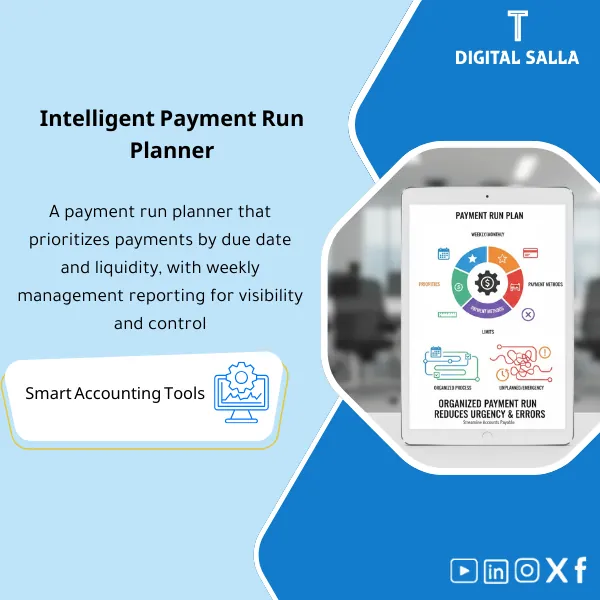
Payment Run Planner – Excel Template
34.31 $
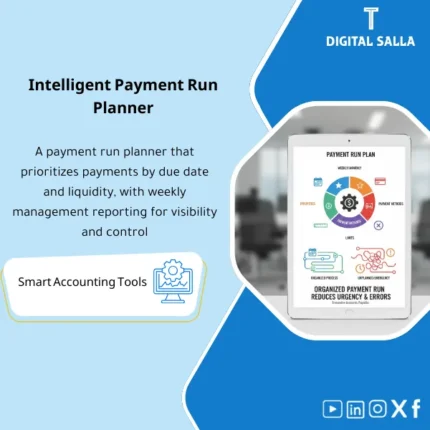
Payment Run Planner: Schedules payments by due date, priority, DOA limits, and payment method. Delivers a weekly payment plan that reduces urgent payments and clarifies cash impact for finance and AP teams.
Payment Scheduling
Payment Run Planner for organizing weekly payment runs for suppliers — Excel payment schedule + payment priorities + linking to weekly liquidity (Cash/Facilities) with a reviewable approval file
Value Proposition: Payment Scheduling becomes a crisis when payment becomes a “reaction” instead of running a plan: invoices are paid because the supplier called, or due to supply pressure, or because the team discovered a significant liability at the last moment. The accounting result is not just a delay/acceleration… but a loss of trace: why was this invoice paid before others? Who approved the change in priority? This Payment Run Planner builds a complete operating cycle: inputs from AP aging + list of Holds/Disputes → arranging payment priorities → testing the impact of payments on liquidity → approving the payment plan → outputting the payment execution file + evidence pack (Payment run pack).
In 20 Seconds: What Will You Get?
- Weekly Payment Schedule Excel: Who will pay? How much? When? And why?
- Payment Run Planner converts AP aging into a payment proposal list for execution.
- Weekly Payment Plan segmented by due date + priority level + Hold/Dispute constraints.
- Payment Priorities with clear rules (Overdue/critical vendor/early payment discount/contract risk).
- Liquidity Management for Payments: View the impact of the payment plan on the cash position for the week (before/after).
- Supplier Payment Run with execution file: (Vendor, IBAN, Amount, Invoice refs) + checklists.
- Approval & Evidence Pack: Who proposed? Who modified? Who approved? With reasons for any exceptions.
CTA related to outputs: Receive Weekly payment schedule + payment proposal + cash impact + approval pack ready.
Suitable For
- Treasury: Linking payments to actual liquidity and facilities instead of “discovering shortfalls after payment.”
- Accounts Payable: Transforming AP aging into an organized payment run with Holds/Disputes and closing exceptions.
- Controller / CFO: Approving priority decisions based on evidence (Overdue/contract/discount) rather than momentary pressure.
Not Suitable For
- If there are no due date data or extractable AP aging — you will first need to adjust the data in AP for the planner to work correctly.
- If your goal is to implement direct automated payments from Excel to the bank — this is not a banking conversion tool but a planning and approval file.
Without Planning / With Planning (Brief Comparison)
| Item | Without Payment Run Planner | With Planner |
|---|---|---|
| Priority | Unrecorded payment decision (who yelled the loudest?) | Payment priorities with rules + documented exceptions |
| Liquidity | Payment impact shows after execution | Liquidity management for payments (before/after) + decision limits |
| Control | No approval file explaining why paid/not paid | Payment run pack + approvals + invoice refs + trace |
Before Use: 5 Symptoms of Disorganized Payment Runs
- The payment list changes on the last day due to supplier pressure or “urgent request” without documented reason.
- No clear separation between “due for payment” and “not paid due to Hold/Dispute/lack of documentation.”
- Payments exceed available liquidity or are executed and then resorting to facilities spontaneously.
- Difficulty explaining “why didn’t we pay vendor X?” or “why did we pay an invoice early?”.
- Month‑End: Last week’s payments are not documented in the closing file, making it difficult to track clearing and timing of entries.
How to Implement Payment Scheduling Practically from AP Aging to Payment Run?
The journey begins by uploading open supplier invoices (AP open items) with due dates and Holds/Disputes. Then, payment priority rules are applied to produce an initial payment proposal. The plan is then tested at the liquidity level (Cash position + inflows + facilities) to show its impact before execution. After the plan is approved, the template outputs a “execution file” used in the supplier payment run within ERP or bank portal, along with an evidence file detailing any exceptions or changes in priorities.
Implementation Method (3 Steps)
Step 1: Preparation and Report Gathering
- Extract AP aging/open invoices (Invoice#, Vendor, Due date, Amount, Currency, Hold flag, Dispute flag).
- Compile cash position for the week (Opening cash + expected inflows + short-term facility/loan limits).
- Define decision policies: minimum liquidity, early payment discount rules, and handling rules for critical vendors.
Step 2: Payment Priorities + Exceptions + Execution File
- Convert data into Weekly Payment Schedule Excel with columns: Priority, Pay/No‑pay reason, Proposed payment date.
- Output Payment proposal:
- Overdue: Late invoices that need processing first.
- Due soon: Invoices due within 7/14 days.
- Optional: Early payment for discount (if available) or for supply reasons.
- Manage exceptions:
- Holds/Disputes are automatically excluded and appear in the “Hold queue” with Owner and closure step.
- Any payment outside the rules is recorded as an Exception with reason and approver.
- Produce the execution file for supplier payment runs (Vendor, IBAN, Amount, Invoice refs) + review Checklist.
Step 3: Cash Impact + Approvals + Month‑End Pack
- Display Liquidity Management for Payments: Opening cash → inflows → planned payments → closing cash (before/after the plan).
- Finalize the plan: Sign Prepared/Reviewed/Approved + Change log (who modified the priority and why).
- Prepare Payment run pack: Copy of the plan + execution file + holds list + evidence index for executed payments (bank advice/ERP payment doc).
Template Components (Clear Inventory)
-
AP Open Invoices Import
- Practical Purpose: Importing open supplier invoices as the basis of the plan.
- When to Use: Before each weekly payment run.
- Resulting Evidence: Snapshot of invoices within the payment plan.
-
Priority Rules Engine (Payment Priorities)
- Practical Purpose: Applying fixed rules to determine priorities (Overdue/Due soon/Critical/Discount).
- When to Use: With every planning cycle.
- Resulting Evidence: Reason for priority for each invoice (traceable).
-
Hold & Dispute Queue
- Practical Purpose: Separating invoices that cannot be paid due to missing documents/disputes/mismatches.
- When to Use: Weekly with Owner follow-up.
- Resulting Evidence: Trackable and closable Holds list.
-
Weekly Payment Schedule (Weekly Payment Plan)
- Practical Purpose: A weekly schedule showing who will pay, when, how much, and with which invoice references.
- When to Use: Weekly.
- Resulting Evidence: Approved plan used for execution.
-
Cash Position & Impact View (Liquidity Management for Payments)
- Practical Purpose: Testing the impact of the plan on liquidity before execution (Opening → Inflows → Payments → Closing).
- When to Use: Before plan approval.
- Resulting Evidence: Justification of decision: why we paid/deferred within clear liquidity limits.
-
Payment Execution File (Supplier Payment Run Execution File)
- Practical Purpose: A file prepared for input into ERP/bank portal: Vendor, IBAN, Amount, Invoice refs.
- When to Use: On execution day.
- Resulting Evidence: Execution file + references that can be linked to bank notifications.
-
Approvals & Change Log
- Practical Purpose: Documenting who proposed, who approved, and any changes in priorities (and their justification).
- When to Use: Every payment run.
- Resulting Evidence: Audit trail for payment decision.
-
Payment Run Pack (Delivery File)
- Practical Purpose: Compiling an approved copy of the plan + execution file + execution outputs (bank advice/ERP payment doc) + evidence index.
- When to Use: Weekly, and included in Month‑End at the end of the month.
- Resulting Evidence: Reviewable file linking payment decision to execution.
What Should Be Included in the Delivery?
- 01-Payment-Run-Planner.xlsx: The main planning file (imports + priorities + schedules + approvals).
- 02-AP-Open-Invoices-Import.xlsx: Template for uploading open AP invoices + due dates/holds.
- 03-Priority-Rules-Setup.xlsx: Setup for payment priority rules + thresholds + exception policy.
- 04-Hold-Dispute-Queue.xlsx: Holds/Disputes list + Owner + action + ETA.
- 05-Weekly-Payment-Schedule.xlsx: Weekly payment plan + proposed payment dates + totals.
- 06-Cash-Position-Impact.xlsx: Liquidity management for payments (opening/inflows/payments/closing) + limits.
- 07-Payment-Execution-File.xlsx: Supplier payment run execution file (Vendor/IBAN/Amount/Invoice refs).
- 08-Approvals-Change-Log.xlsx: Approvals and changes log + reason for modification.
- 09-Evidence-Index.xlsx: Evidence index for execution (bank advice/ERP payment doc) + links.
- 10-Payment-Run-Pack.xlsx: Comprehensive delivery file (plan snapshot + execution summary + sign‑off).
- 11-Checklist-Payment-Run.pdf: Pre/Post-execution checklist (IBAN checks/duplicate payments/holds).
- 12-Runbook.pdf: Weekly operational run (Import → Prioritize → Cash test → Approve → Execute → Pack).
- 13-Archiving-Map.docx: Archiving tree (Year/Month/Treasury/PaymentRuns/Evidence) + Naming.
- 14-Signoff-Page.docx: Prepared/Reviewed/Approved + weekly scope.
After Implementation (Two Points Only)
- Operational Outcome for the Team: Supplier payment runs become a clear weekly “Run”: a list of due invoices + separate Holds + documented payment priorities + ready execution file, instead of rebuilding the list from scratch each time.
- Control/Audit Outcome: Every payment has a Trace: Invoice/Reference → Reason for inclusion in payment → Approval → Execution → Evidence (bank advice/ERP doc) within the Payment run pack, reducing disputes of “who decided?”.
FAQ — Questions Before Purchase
Is the Payment Run Planner suitable for any ERP system?
Yes. Its primary requirement is to output open invoices/AP aging and hold data. Planning is done in Excel and execution is done in ERP/bank.
Does it support a weekly or monthly payment plan?
Designed as a Weekly Payment Plan (Payment runs), and weeks can be aggregated to produce a monthly view if desired.
How are payment priorities determined?
Through adjustable rules: Overdue first, then Due soon, then critical vendors/operational risk, then early payment discounts, with an exception log for any decision outside the rules.
Does it handle partial payments?
Yes, through the “Proposed payment amount” column allowing partial payments with documented reasons (liquidity/dispute/payment segmentation).
Does it effectively cover liquidity management for payments?
It covers the “testing the impact of the payment plan” on the cash position for the week (before/after) based on what you input for Opening cash and inflows and facility limits. It is not a Treasury system but a clear decision file.
Does it prevent duplicate payments?
It provides checks within the planner (Invoice refs + duplicate flags), but preventing duplicate payments entirely also depends on ERP controls and 3‑Way match/AP controls.
What is the minimum data required to get started?
Invoice number + Vendor + Due date + Amount + Currency + Hold flag. Adding IBAN from Vendor master facilitates preparing the execution file.
Is there a template for management approval of the payment plan?
Yes: Approval fields + change log + sign‑off, and approval levels can be specified based on total payment ceilings for the week.
Is it suitable for Month‑End?
Yes: The last run of the month is included in the Closing Pack as it shows executed/pending payments and facilitates tracking clearing in AP.
Ready to Adopt a Reliable Weekly Payment Run Instead of Ad-Hoc Lists?
Outputs: Payment Run Planner + Weekly Payment Plan + Payment Priorities + cash impact + approval and execution file.
| المسمّى الوظيفي | |
|---|---|
| Duration | |
| المستوى | |
| التحديثات | |
| القطاع | |
| الصيغة |



Reviews
Clear filtersThere are no reviews yet.