



Manufacturing Job Costing – Excel Template
84.84 $
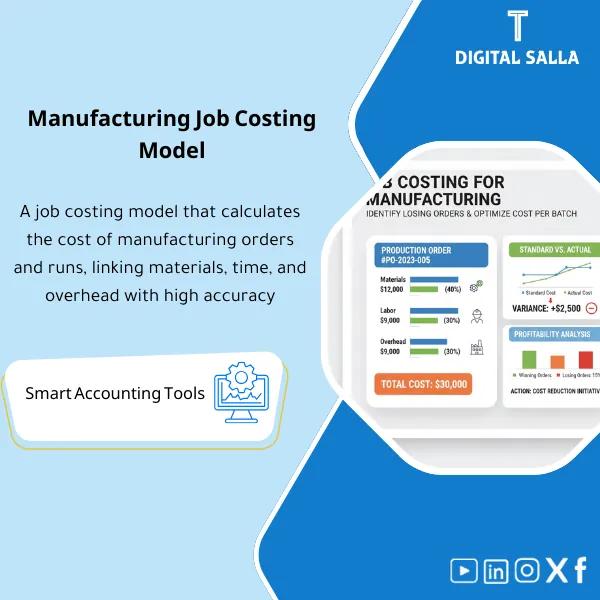
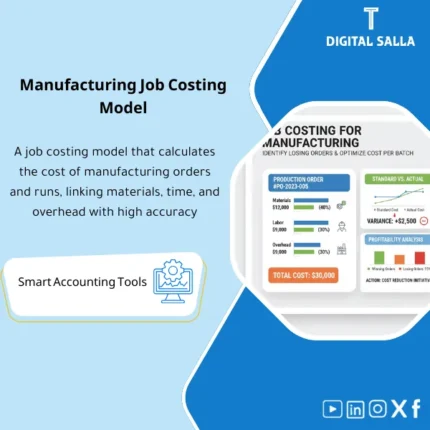
Job Costing for Manufacturing: Calculates the total cost per production order (materials/labor/overhead) and compares standard vs actual to identify batch-level variances. Delivers order profitability and variance reporting before WIP close.
Job Costing for Manufacturing
A practical template (Excel/Tracker Pack) for accurately calculating Job Costing through Direct Materials + Direct Labor + Overhead (OH) with tracking of WIP, comparing Budget vs Actual, and showing Profitability for each Production Order (Unit Cost & Margin).
Value Proposition: Instead of factory costs being “general averages,” this template allows you to see costs at the Job/Production Order level: How much did you spend on materials? How many labor hours? How much OH was allocated? What is the cost per unit? And what is the actual profitability compared to pricing/quotations?
In 20 seconds: What will you get?
- Job Cost Sheet: A cost sheet for each production order (Materials/Labor/Overhead/Total).
- Material Ledger by Job: Material consumption (Issue/Return/Scrap) linked to the order.
- Labor Timesheet by Job: Operating hours/wages by Work Center/Shifts/Employee/Order.
- OH Allocation: Allocation of indirect costs at a (Predetermined Rate) based on Driver (Hours/Units/Machine Time).
- WIP & Completion: Tracking of Work in Progress + transfer to Finished Goods upon closure/completion.
- Job Profitability: Unit cost + margin/profitability of the order (for orders linked to sales/contracts/special requests).
- Variance View: Variances (Actual vs Standard/Estimated) for the order, materials, labor, and OH.
- Dashboard: Highest cost orders, loss orders, reasons for cost overruns, analysis by line/work center.
- GL Export (optional): Summary ready for linking with entries (WIP/FG/COGS/OH Variance).
Delivery associated with the button: Job Cost Sheet + Materials/Labor/OH + WIP + Profitability + Dashboard.
Suitable for
- Job/Batch Factories: Multiple production orders with significant variability in material/hour consumption.
- Make-to-Order Manufacturing: You want to prove the profitability of each order/customer.
- Factories with Multiple Work Centers: Need to allocate OH in a fair and understandable manner.
- Finance/Costing: You want to reconcile WIP/FG/COGS and explain cost variances.
Not Suitable for
- If material consumption or labor hours are not recorded at the production order level — you will need to implement a minimum level of discipline first.
- If you need real-time costing linked to machines (OEE/MES) — this is a reporting and analysis template, not an industrial operating system.
Without the template / With the template
| Item | Without the template | With the template |
|---|---|---|
| Production Order Cost | “Average” cost at the factory level | Detailed cost for each Job (Materials/Labor/OH) |
| WIP Tracking | Unclear or “estimated” WIP at closure | WIP Balance by Order + Status (Open/Completed) |
| Cost Overrun Explanation | Difficult to identify the cause (Materials? Hours? OH?) | Variance View clarifies the deviation by cause and Driver |
| Order Profitability | General profitability does not show losers from winners | Job Margin/Unit Cost + alert for loss orders |
Before Use: 5 Symptoms That You Need Job Costing
- Significant discrepancies in order results: some are “successful” while others “eat into company margins” without understanding the reason.
- High WIP or difficulty explaining the balance of work in progress at month-end.
- Recurring material or labor hour overruns, but no single report links them to the orders.
- OH allocation is done “generally” and cannot be defended in front of management/audit.
- Ongoing discussion between production and finance: “accounting cost” vs “operational cost” with no point of convergence.
What Does the Job Costing Template for Manufacturing Cover?
It covers a complete cycle: Cost Accumulation → OH Allocation → WIP/Completion Tracking → Variance and Profitability Analysis.
The goal is to make the order cost “explainable” rather than just a number.
Key Definitions
- Direct Materials (DM): Materials issued to the order (Issue) minus returns (Return) + scrap adjustments (Scrap) as needed.
- Direct Labor (DL): Hours/wages of direct labor associated with the order (Timesheet/Clocking).
- Manufacturing Overhead (MOH): Indirect allocation based on Driver (Labor Hours/Machine Hours/Units) × Allocation Rate.
- Total Job Cost: DM + DL + MOH
- Unit Cost: Total Job Cost ÷ Qty Produced (Good Output)
- WIP: Accumulated cost for orders that have not been closed/converted to finished goods yet.
Implementation Method (5 Steps)
Step 1: Define the Order and Product Structure
- Order Number (Job/PO) + Product (SKU) + Planned Quantity + Dates (Start/End) + Line/Work Center.
- Determine if the order is linked to a customer/contract (for profitability) or inventory production (for FG).
Step 2: Enter Material Consumption for the Order
- Material Issue/Return/Scrap with Order Number + Material Code + Quantity + Unit Cost (Standard/Actual).
- Adjust inventory variances (if any) and consider them within DM or as Variance according to your policy.
Step 3: Enter Labor Hours/Wages
- Timesheet by (Employee/Work Center/Activity/Job) + Hours + Rate.
- You may separate “Setup time” from “Run time” for better interpretation.
Step 4: Allocate OH
- Select Driver: DL hours / Machine hours / Units.
- Allocation Rate: Predetermined overhead rate, with optional display of Over/Under absorption.
Step 5: Close the Order and Link WIP/FG/COGS
- Upon Completion: Transfer the order cost from WIP to FG (or directly to COGS for special orders).
- Monthly summary to reconcile WIP with the General Ledger (GL).
Product Components (Clear Inventory)
-
Jobs Master (Production Order Data)
- Fields: Job No | SKU | Planned Qty | Start/End | Line/Work Center | Customer/Project (optional) | Status.
- Purpose: The hub connecting materials, hours, OH, and outputs.
-
Materials by Job (Consumption/Return/Scrap)
- Fields: Date | Job No | Item | Issue/Return/Scrap | Qty | Unit Cost | Reference Doc.
- Outputs: Direct Materials Cost per Job + Analysis of top materials causing overruns.
-
Labor by Job (Hours/Wages)
- Fields: Date | Job No | Employee | Work Center | Hours | Rate | Labor Cost | Activity.
- Outputs: Direct Labor Cost per Job + Efficiency Analysis.
-
OH Allocation (Indirect Costs)
- Fields: Driver | Rate | Applied OH | Over/Under (optional).
- Key Feature: Clear definition of the Driver for easier defense.
-
Job Cost Sheet (Order Cost Summary)
- Outputs: DM + DL + MOH = Total | Unit Cost | Variance vs Standard | Status.
- Reports: Top 10 High Cost Jobs / Jobs Over Budget.
-
WIP & Completion Register (WIP and Closure Book)
- Outputs: WIP Opening + Additions + Transfers to FG/COGS + Closing.
- Important for Finance: A clear bridge between operations and accounting.
-
Profitability (Order Profitability)
- Fields (optional): Sales Price/Revenue | Discounts | Total Cost | Gross Margin | GM%.
- Use Cases: Custom manufacturing, quotations, manufacturing contracts.
-
Dashboard & Controls (Dashboard + Controls)
- Alerts: Job without material consumption, Job without hours, Unit cost out of bounds, OH Rate not updated.
- Indicator Dashboard: Cost/Unit Trend, OH Applied, WIP Aging, Top Reasons for Variance.
Suggested Tabs within the Delivery File
- Jobs | Materials | Labor | OH Rates | Job Summary | WIP | Profitability | Dashboard | Controls | GL Export.
After Implementation (Just Two Points)
- Operational Outcome: You will accurately know which orders “consume” materials or hours or cause bottlenecks because costs are now at the Job level.
- Financial Outcome: You will have an auditable explanation for unit cost, WIP, and OH, with a direct link between operations and the general ledger.
FAQ — Questions Before Purchase
Is the template suitable for continuous manufacturing (Process Manufacturing)?
It is suitable if you have a clear “Batch/Order” (even within Process). If production is continuous without distinct orders, you may need Process Costing more than Job Costing.
How do we allocate indirect costs (OH) logically?
Choose a Driver that reflects resource consumption (Machine hours or DL hours), then set a predetermined allocation rate. The template supports showing Over/Under absorption if desired.
Can we use Standard Cost instead of Actual?
Yes. You can run the template in two ways: Standard for comparison and pricing, and Actual for actual analysis — or both together to show variances.
How do I handle Scrap/Rework within Job Costing?
Scrap is recorded as quantity/cost (wasted materials/rework) according to your policy: either within the order cost (to show the reality) or within a separate variance/quality account for control.
Does it provide outputs that assist in accounting entries?
Yes, through the GL Export tab (optional) to prepare summaries for transferring WIP→FG or WIP→COGS and reconciling OH variances. (The final entry implementation depends on the chart of accounts and company policy).
What is the minimum level of discipline required for the template to succeed?
Three things: (1) A clear order number, (2) Material consumption linked to the order, (3) Recording hours linked to the order. Without these, gaps will appear that do not reflect reality.
If your goal is to accurately know the cost and profitability of each production order (Materials + Labor + OH + WIP)
Outputs: Job Cost Sheet + Unit Cost + WIP Register + Variances + Job Profitability + Dashboard.
| المسمّى الوظيفي | |
|---|---|
| Duration | |
| المستوى | |
| التحديثات | |
| القطاع | |
| الصيغة |



Reviews
Clear filtersThere are no reviews yet.