


Multi-level BOM Cost Roll-up – Excel Template
84.84 $
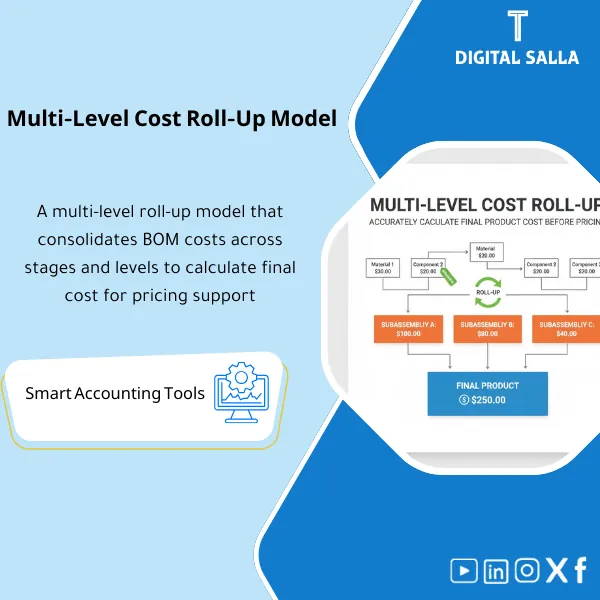
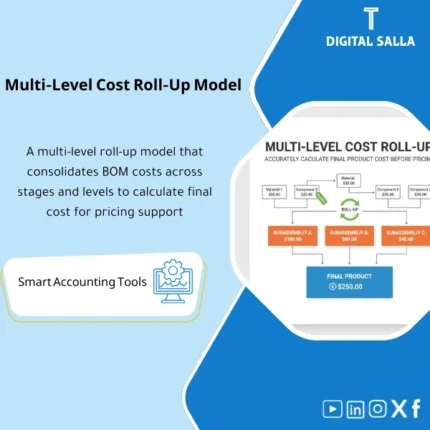
Multi-Level BOM Cost Roll-Up: Aggregates component and subassembly costs across BOM levels to estimate finished product cost pre-production. Delivers cost roll-ups and alternative cost scenarios to support standard cost updates and pricing reviews.
Multi-level BOM Cost Roll-up Template
A practical template (Excel/Costing Pack) for calculating Final Product Cost through Multi-level BOM Cost Roll-up (FG → Subassemblies → Components) with support for versions and effective dates, updating component costs, and performing BOM Change Impact Analysis on unit cost and margin.
Value Proposition: Instead of relying on “estimated costs” or manual collection of components, this template performs an automatic Roll-up of costs at each level of the BOM until reaching the final product cost, with clear breakdown: Materials + Conversion/Operating + Overhead (optional) + Scrap/Yield (optional).
In 20 seconds: What will you get?
- Multi-level Cost Roll-up: Calculate FG cost across all levels of the BOM (including Subassemblies).
- Subassembly Costing: Automatically calculate the cost of each subassembly from its components.
- Version & Effective Date: Compare BOM costs by version/effective date (Current vs New).
- Change Impact: Report on “what impact does changing quantity/component/alternative” have on unit cost.
- Component Cost Updates: A central page for updating material/component costs (Purchase/Standard/Last).
- Cost Breakdown: Breakdown of costs by (Level / Component Type / Make vs Buy).
- Controls: Identify components with no cost, BOM loops (Circular), duplicates, and mismatched units of measure.
- Scenario Analysis: Scenarios for “new supplier price” or “material alternative” or “increasing Scrap%.”
- Dashboard: Top products by cost/change in cost/most impactful components.
- Export-ready: Cost summary per unit suitable for pricing/standard cost/update in ERP.
Delivery associated with the button: BOM Master + Cost Table + Roll-up + Change Impact + Dashboard + Controls.
Suitable for
- Factories with multiple manufacturing levels: (FG → Subassembly → Parts).
- Pricing/Product Teams: Want to accurately calculate unit cost before pricing or before bids.
- Engineering/Industrialization: Assessing the impact of BOM changes (ECO) on cost.
- Finance/Costing: Updating Standard Cost and comparing “old vs new” costs.
Not Suitable for
- If there is no approved BOM or quantities/units are not consistently defined.
- If you need complete engineering management (PLM) with workflow approvals — this is outside the scope of the Excel template.
- If the BOM is too complex with thousands of items and requires database processing — you can start with the template and then convert it to a larger tool.
Without the template / With the template
| Item | Without the template | With the template |
|---|---|---|
| FG Cost Calculation | Manual/Approximate/Unverified collection | Automatic Roll-up across all levels of the BOM |
| Subassembly Cost | Unclear/Calculated once and forgotten | Automatically calculated and updated with any change in components |
| BOM Changes (ECO) | “We only know the impact after a while” | Change Impact shows the cost delta immediately |
| Data Quality Control | Incorrect costs due to missing Costs or duplicates | Error/Warning list (Missing Cost / Circular BOM) |
Before Use: 5 Symptoms That You Need Multi-level Cost Roll-up
- Material prices change frequently, but the final product cost is not updated systematically.
- Multiple Subassemblies exist, and no one knows the cost of each subassembly “today.”
- Every change in the BOM leads to lengthy discussions: “Is the cost increase 3% or 12%?”
- Difficulty in identifying “the most impactful component” on product cost (Cost Driver) for alternative/negotiation decisions.
- Pricing new products without a clear defensible Cost Breakdown in front of management or audit.
What Does the Multi-level BOM Cost Roll-up Template Cover?
It covers the journey “from raw BOM table to precise unit cost” through:
BOM Data Cleaning → Component Cost Identification → Multi-level Roll-up →
Change Impact Analysis → Outputs ready for pricing/Standard Cost.
Key Definitions (Simply)
- Single-level BOM: Components at a single level for a product.
- Multi-level BOM: Components + subassemblies that also contain BOMs.
- Roll-up: Summing component costs across levels to reach the final product cost.
- Where-used: Where this component is used within products/assemblies.
- Effectivity: Date/period of validity of the BOM version (before/after engineering change).
Implementation Method (6 Steps)
Step 1: Prepare BOM Data
- Unified table structure: Parent | Component | Qty per | UOM | Scrap% (optional) | Version | Effective From/To.
- Determine if the Component is “Purchased” or “Manufactured/Subassembly.”
Step 2: Enter Component Cost Table
- Cost Table for components: Material Cost | Last Purchase | Standard | Currency | Vendor (optional).
- You can add Landed Cost/Packaging/Other Add-ons if needed.
Step 3: Calculate Subassembly Costs
- The cost of each Subassembly is calculated from its components (even if Subassemblies are within Subassemblies).
- Display the level (Level) for easier review.
Step 4: Roll-up for FG Cost
- FG Cost = Sum (Qty × Cost) for each component after calculating the cost of subassemblies.
- Optional: Apply Scrap/Yield to consumption quantity or waste cost.
Step 5: Analyze Change Impact
- Compare BOM Version A vs Version B or Baseline vs Scenario.
- Show “Top 10 Components driving delta” to identify the cause of increase/decrease.
Step 6: Output Results for Use
- Unit Cost + Cost Breakdown for use in pricing or updating Standard Cost in ERP.
- Review report: Missing Costs / Circular BOM / UOM Issues before finalizing results.
Product Components (Clear Inventory)
-
BOM Master (Multi-level BOM Structure)
- Fields: Parent | Component | Qty per | UOM | Level (calculated/optional) | Version | Effective Dates | Make/Buy.
- Purpose: Source of truth for product structure and its branches.
-
Item/Component Cost Table (Component Costs)
- Fields: Item | Cost Type | Standard/Last/Avg | Currency | Updated Date | Notes.
- Purpose: Quick update of material costs linked to the Roll-up.
-
Subassembly Cost Sheet (Subassembly Costs)
- Outputs: Cost of each Subassembly + Breakdown of its components + Depth level.
- Benefit: Knowing “block costs” within the product instead of just seeing FG.
-
Roll-up Engine (Cost Roll-up Engine)
- Outputs: Total FG Cost | Unit Cost | Cost Breakdown by Level/Type.
- Options: Scrap/Yield | Additional Add-ons | Conversion/OH (optional).
-
Change Impact Analyzer (BOM Change Impact Analysis)
- Outputs: Delta Cost vs Baseline + List of top impactful components.
- Cases: Material alternative, quantity change, component deletion/addition, subassembly change.
-
Where-used Report (Where the component is used)
- Outputs: List of products/assemblies that will be affected if the cost of this component changes.
- Benefit: Support negotiation with suppliers and manage risks of price increases.
-
Data Quality Controls (Data Quality Controls)
- Checks: Missing Cost | Circular BOM | Duplicate Lines | UOM mismatch | Negative Qty.
- Benefit: Prevent approval of incorrect costs due to uncontrolled BOM data.
-
Dashboard (Dashboard)
- KPIs: Highest FG Cost | Highest Cost Delta | Most Impactful Component | Cost distribution by BOM levels.
Suggested Tabs within the Delivery File
- BOM | Costs | Roll-up | Subassemblies | Change Impact | Where-used | Controls | Dashboard.
After Implementation (Only Two Points)
- Result for Product/Engineering: You will immediately know the impact of any change in the BOM or material alternatives on unit cost, before approving the change.
- Result for Finance/Pricing: You will have a reviewable Unit Cost and Cost Breakdown, making it easier to update Standard Cost and explain any changes in margins.
FAQ — Questions Before Purchase
Does the template support multiple BOM versions and effective dates?
Yes. You can enter Version and Effective From/To and then compare costs “before/after” (Baseline vs New).
How does the template handle Subassemblies?
If the component is “Manufactured/Subassembly” and has a BOM, the template will calculate its cost from its components and then roll it up to the higher level automatically.
Does it support Scrap/Yield?
Yes (optional). You can enter Scrap% or Yield Factor to adjust consumption/cost and show the impact of waste on Unit Cost.
Can OH or Conversion cost be included?
Yes as an option: either add a fixed Conversion Cost for each Subassembly/FG, or add OH as a value/percentage within the assemblies according to your policy.
(If you need advanced OH based on hours/work centers, it is best to link it with Routing/Work Centers or Job Costing models).
How does the template ensure result accuracy?
Through the Controls tab that reveals: components with no cost, BOM loops, duplicates, UOM issues.
Before approving any Cost Roll-up, review the warning list and resolve them.
Can it be used for pricing (Cost-Plus)?
Yes. Because it provides a detailed Unit Cost, you can add a target margin (Markup) and analyze the impact of BOM changes on price/margin.
If your goal is to accurately calculate the final product cost through multi-level BOM + analyze the impact of BOM changes
Outputs: FG Unit Cost + Subassembly Costs + Change Impact + Where-used + Dashboard + Data Controls.
| المسمّى الوظيفي | |
|---|---|
| Duration | |
| المستوى | |
| التحديثات | |
| القطاع | |
| الصيغة |
Related products





Reviews
Clear filtersThere are no reviews yet.