




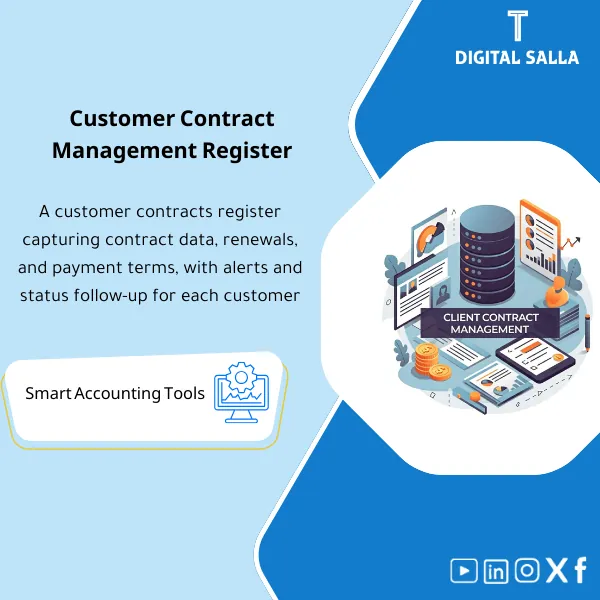
Customer Contracts Register – Excel Template
42.29 $
Customer Contract Management Template is a comprehensive Excel-based program to manage customer contracts effectively, including contract data, payments tracking, completion percentages, delivery dates, and project profitability—supported by automated reports that improve contract oversight and customer relationships.
Contract Management
Subtitle: Customer Contract Management Template: Contract Register + Renewals/Notice Calendar + Obligations/Deliverables Tracker + Billing Triggers + Month-End Delivery File
Value Proposition: Contract Management within finance does not mean “saving PDFs in a folder.” The problem arises when there are numerous contracts with varying Contract Types (Subscription/Project/Framework/Maintenance), and their effects manifest during closing: invoices issued without a clear trigger, renewals lost due to notice periods, performance/delivery obligations undocumented, and discounts/variable items appearing as late CNs. This template builds a complete operational journey: from contract entry and summarizing its terms → tracking obligations and deliverables → linking billing and revenue recognition → preparing a reviewable “Contract Pack” for Month-End and Year-End.
In 20 Seconds: What Will You Get?
- Contract Register: A unified contract record (Contract ID, client, Contract Type, value, currency, effective/expiration).
- Key Terms Summary: Summary of accounting and operational terms (Payment terms, Billing triggers, Price changes, penalties, discounts).
- Renewal & Notice Calendar: Renewal/notification calendar (Notice period) + follow-up alerts before expiration.
- Obligations & Deliverables Tracker: Obligations of both parties + acceptance/delivery evidence (Acceptance evidence).
- Billing & Revenue Hooks: Linking billing to contractual points (Milestone/Monthly/On acceptance) and supporting revenue allocation (when needed).
- Exceptions & Approvals Log: Log of exceptions to standard terms + who approved and why.
- Month-End Contract Pack: A delivery file for closing: contracts started/ended/renewed + deferred/advanced items + risk list and accounting recommendations.
CTA related to outputs: You will receive Contract Register + Renewal Calendar + Obligations Tracker + Month-End Contract Pack ready for operation.
Suitable For
- Head of Accounts / Controller: Building a closing file related to contracts (Start/End/Renewals/Deliverables) instead of relying on memory.
- AR / Billing: Linking the invoice to a contractual trigger and filtering “invoices without documentation” or “documentation without an invoice.”
- Commercial Finance / Sales Ops: Tracking renewals, discounts, and exceptions with financial knowledge and approval signatures.
Not Suitable For
- If you are looking for Contract Management Solutions as a technical system (Workflow/Emails/Integrations) — this is an operational and documentation template, not a platform.
- If your goal is official government/legislative documentation (like Mudad contract documentation platform or insurance contract documentation) — the template supports internal data preparation but does not execute documentation.
Without the Template / With the Template (Short Comparison)
| Item | Without Organized Contract Management | With Contract Management Template |
|---|---|---|
| Month-End | Late reconciliations when discovering terms/discounts/renewals | Month-End contract pack clarifies (started/ended/renewed/delayed delivery) + accounting recommendations |
| Renewal & Notice | Notice periods are lost → loss of termination/modification rights | Renewal calendar + alerts + Owner + documentation of action |
| Evidence | No linkage between contract, delivery, and invoice | Evidence index: Contract → Deliverables/Acceptance → Billing trigger → Invoice |
Before Use: 5 Symptoms That Contracts Are Managed as Files, Not as a Closing Tool
- No unified Contract ID, leading to duplicate contracts or lost amendments/appendices within folders.
- Renewals expire without following the notice period → loss of negotiation/modification or unintended automatic continuation.
- Billing triggers are unclear: an invoice is issued while no delivery/acceptance has occurred, or delivery has happened without an invoice.
- Contracts start on a later date (Deferred contracts meaning future effective) but revenue/billing is not separated from the effective period.
- During internal review, the question “Where is the evidence of the condition/exception/approval?” arises, and there is no evidence index or approvals log.
How is Contract Management Practically Implemented from Signing to Month-End?
The template treats the contract as a “financial and operational record” rather than just a document. It starts with entering basic data, then summarizing the terms that affect billing and revenue recognition. Next, obligations and deliverables are managed as cases (Delivered/Accepted/Pending) with reference evidence. With each amendment/appendix, a change order is recorded with date and impact. Before closing, the template generates a list of contracts affecting the period (started/ended/renewed/with exceptions) to be part of the Closing Pack instead of relying on questions like “Who has a new contract?”
Implementation Method (3 Steps)
Step 1: Preparation and Report Gathering
- Gather contract copy + appendices (SOW/Quotation/Change order) + identify commercial Owner and financial Owner.
- Define standard fields: Contract type, effective/expiration dates, payment terms, renewal and notice terms, billing trigger, and discount/penalty items.
- Determine evidence paths: Where will we store delivery/acceptance/approvals documents? (Folder map + naming).
Step 2: Registration + Follow-Up + Amendments Log
- Enter the contract in the Contract Register and issue a Contract ID, documenting contract documentation internally via the evidence index (paths/links).
- Activate the Renewal & notice calendar to set follow-up dates before expiration/renewal.
- Record obligations and deliverables: Deliverables, Acceptance criteria, and Milestones and link them to billing points.
- Record any exceptions to standard terms (special discount/compensation clause/termination condition) in the Exceptions log with approval.
- Record any Change order/Amendment with its impact on value, duration, and billing terms.
Step 3: Month-End Pack + Tie-Out + Accounting Points
- Output contracts for the period: New/Modified/Expired/Renewed + list of Deliverables not yet accepted + invoices without a trigger or trigger without an invoice.
- Identify accounting impacts requiring decisions: Deferred/advanced revenue, variable discounts, or items requiring adjustment/reclassification.
- Compile Month-End Contract Pack: register snapshot + exceptions + approvals + evidence index + sign-off (Prepared/Reviewed).
Template Components (Clear Inventory)
-
Contract Register (Customer Contracts Register)
- Practical Purpose: A single source of truth: Contract ID, client, Contract Types, value, currency, effective/expiration, Owner.
- When to Use: When signing a new contract/updating an existing contract + weekly review.
- Resulting Evidence: Approved snapshot from the register attached within the closing file.
-
Key Terms Summary (Summary of Financially Impactful Terms)
- Practical Purpose: Extracting terms that change billing and revenue: Payment terms, Billing triggers, Discounts, Penalties, Indexation.
- When to Use: When entering the contract + at any amendment/change.
- Resulting Evidence: Key-terms sheet available for audit instead of referring back to the PDF each time.
-
Renewal & Notice Calendar (Renewal and Notice Calendar)
- Practical Purpose: Identifying notice (Notice) and renewal/termination dates and linking them to the Owner for follow-up.
- When to Use: Weekly review + before Month-End to identify contracts that have expired/are about to expire.
- Resulting Evidence: Follow-up log proving that the notice/action was done on time.
-
Obligations & Deliverables Tracker (Performance/Delivery Obligations)
- Practical Purpose: Linking delivery/acceptance to documents (Acceptance/Delivery proof) to determine billing/recognition points.
- When to Use: Throughout the month with updates on the status of each Deliverable.
- Resulting Evidence: Documented delivery status + evidence links for each contract.
-
Billing Triggers & Invoicing Map (Billing Map)
- Practical Purpose: Translating contract terms into actionable Triggers: Monthly, Milestone, On acceptance, Advance.
- When to Use: Before issuing the invoice + Week-4 to filter “pending invoices.”
- Resulting Evidence: List of due/not due invoices with a clear reason (trigger met/not met).
-
Deferred/Upcoming Contracts Flag (Deferred/Future Contracts)
- Practical Purpose: Distinguishing contracts with future effective dates (deferred contracts meaning later effective date) to avoid mixing with the current period.
- When to Use: When entering the contract + Month-End for cut-off review.
- Resulting Evidence: List of “Not effective yet” contracts within the closing file to explain non-recognition/billing.
-
Change Orders / Amendments Log (Amendments Log)
- Practical Purpose: Documenting any change in price/scope/duration and its impact on billing and obligations.
- When to Use: At each amendment or change.
- Resulting Evidence: Before/after log + approval date + document reference.
-
Exceptions & Approvals Log (Exceptions and Approvals)
- Practical Purpose: Governing non-standard items (special discount/termination clause/penalty) and linking them to financial/administrative approval.
- When to Use: During negotiation/before signing + at any substantive change.
- Resulting Evidence: Approval trail reduces disputes over “Who approved?”
-
Evidence Index & Folder Map (Internal Contract Documentation)
- Practical Purpose: Indexing contract files, delivery, approvals, and their storage paths (based on a fixed folder tree).
- When to Use: Daily when adding a new document + Month-End to ensure file completeness.
- Resulting Evidence: Evidence index deliverable for internal/external audit.
-
Month-End Contract Pack (Closing Delivery File)
- Practical Purpose: Outputting a list of contracts affecting the period + exceptions + pending deliverables + accounting recommendations.
- When to Use: Week-4/Month-End and Year-End.
- Resulting Evidence: Closing pack section ready for delivery to the head of accounts/auditor.
What Should Be Included in the Delivery?
- 01-Customer-Contract-Register.xlsx: Customer contracts register + Contract IDs + Contract Types + effective/expiration dates.
- 02-Key-Terms-Summary.xlsx: Summary of terms (Payment/Billing/Discounts/Penalties/Price changes).
- 03-Renewal-Notice-Calendar.xlsx: Renewal and notice calendar + Owners + follow-up.
- 04-Obligations-Deliverables-Tracker.xlsx: Performance/delivery obligations + Acceptance evidence refs.
- 05-Billing-Triggers-Invoicing-Map.xlsx: Billing map (trigger met/not met) + references.
- 06-Deferred-Future-Contracts-Flag.xlsx: Contracts with future effective dates (deferred/upcoming contracts) + cut-off notes.
- 07-Change-Orders-Amendments-Log.xlsx: Amendments log + their impact + document references.
- 08-Exceptions-Approvals-Log.xlsx: Exceptions + approvals + dates.
- 09-Evidence-Index.xlsx: Evidence index (Contract PDF / SOW / Acceptance / Approvals) + links/paths.
- 10-MonthEnd-Contract-Pack.xlsx: Closing summary: new/modified/expired/renewed + pending deliverables + actions.
- 11-Runbook.pdf: Operational run (Intake → register → monitor → month-end pack) + review points.
- 12-Archiving-Map.docx: Storage tree (Year/Month/Contracts/Customers/Evidence) + Naming convention.
- 13-Signoff-Page.docx: Prepared/Reviewed + period scope + closing date.
After Implementation (Two Points Only)
- Operational Outcome for the Team: Any contract becomes a “case” with an Owner, deadlines, renewals, deliverables, and billing; a clear list emerges: What is being billed this month? What is not being billed and why? And which contracts need action before the notice period expires.
- Control/Audit Outcome: You have traceability ready: Contract → Key terms → Deliverables/Acceptance → Billing trigger → Invoice/AR → Month-End pack + approvals + evidence index, reducing disputes over terms and exceptions.
FAQ — Questions Before Purchase
Is this a complete “Contract Management Software”?
No. This is an Excel/Docs template for internal contract management (Registers + Calendar + Evidence + Closing pack). If you need a technical workflow/integration alerts, that would be within contract management software/solutions (SaaS).
Is it suitable for any type of contract?
Yes, as long as they are customer contracts: subscriptions, projects, maintenance, framework… and Contract Types can be classified within the register for unified reporting.
Does it support “Deferred Contracts”?
Yes, meaning contracts with future effective dates (later effective date). The template flags contracts as “Not effective yet” to support cut-off and avoid mixing with the current period.
Does it perform official contract documentation or upload it to a platform?
No. The template supports contract documentation internally (Evidence index + folder map) and data preparation, but it does not execute official “contract documentation service” nor automatically uploads to the Mudad contract documentation platform.
Does it relate to insurance contract documentation?
Contract documentation via insurance/government platforms is often related to employee contracts. This product is dedicated to customer contracts and can only be used as an internal file for data preparation and document tracking—not as a substitute for official documentation.
What is the minimum data required to get started?
Contract copy + client + effective/expiration dates + contract value/currency + payment terms + billing trigger + Owner. Having delivery/acceptance references improves linkage with billing and closing.
Does it assist in Month-End and Year-End?
Yes, through the Month-End contract pack: contracts started/ended/renewed + pending deliverables + exceptions and approvals + accounting points needing decisions (such as deferred/advanced/variable discounts) based on your situation.
Is this an alternative for legal review of the contract?
No. The template assists finance in tracking, documenting, and delivering, while legal review of terms is the responsibility of legal counsel/management.
Ready to Enter Month-End with “Indexed and Tracked” Contracts Instead of Searching Through Emails?
Outputs: Contract Register + Renewal/Notice Calendar + Obligations Tracker + Exceptions/Approvals + Month-End Contract Pack.
| المسمّى الوظيفي | |
|---|---|
| Duration | |
| المستوى | |
| التحديثات | |
| القطاع | |
| الصيغة |





Reviews
Clear filtersThere are no reviews yet.