




HR Administration Template – Excel Template
63.56 $
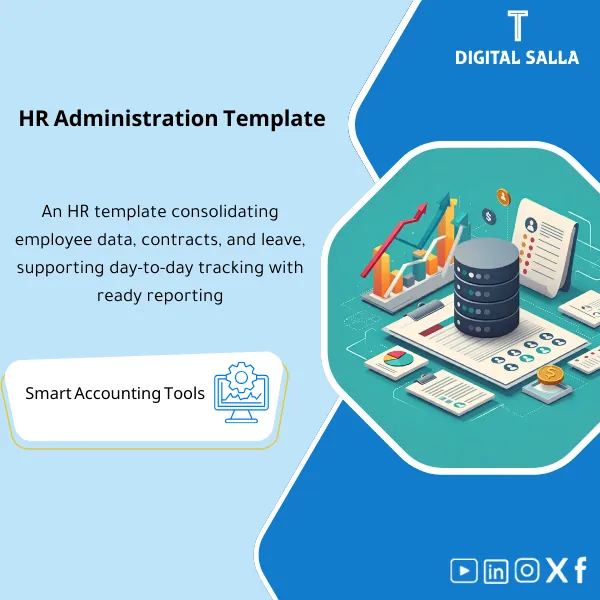
HR Administration Management Template is a comprehensive Excel program to manage end-to-end HR processes from hiring to termination. It features a centralized database, diverse reporting, and process automation—making HR management and workforce analytics more efficient.
Human Resources Management
HR Admin Operating Pack: Employee Master + Change Log + Onboarding/Exit + Payroll Inputs + Closing Pack (Prepared/Reviewed)
Value Proposition: Human Resources Management becomes an accounting “bottleneck” at Month-End when employee changes (hiring/promotion/allowance/termination) are undocumented or lack approvals; the result is payroll discrepancies, unjustified deductions, and difficulty linking Payroll JE to the source of changes. This template builds a complete operating cycle: before employee entry → during change management and documentation → after closing with deliverables (Closing Pack) that are reviewable.
In 20 seconds: What will you get?
- Unified Employee Master Register: Employee data + Cost center/branch + Status (Active/On hold/Exited) + File reference.
- Onboarding Checklist: Inventory of employee entry from “Offer/Contract” to delivery of a complete and reviewed file.
- HR File Index: Index of employee files (What exists / Missing / Owner) instead of manual searching during audits.
- Change Request + Approval: Change form (allowance/deduction/promotion/termination) with financial impact and approvals.
- Payroll Input File: Payroll input file showing “what changed this month” before running Payroll.
- Leave & EOS Schedules: Schedules for leave/end of service (as financial outputs that can be linked to the JE).
- HR Closing Pack: Monthly delivery pack (Prepared/Reviewed) linking Change log ↔ Payroll Register ↔ Payroll JE.
CTA related to outputs: Receive Employee Master + Change Log + Payroll Inputs + HR Closing Pack for a reviewable Month-End delivery.
Suitable for
- HR Admin / Human Resources: To establish employee files and processes for hiring/changing/terminating with documentation and approvals.
- Payroll & Finance: To link HR changes to payroll inputs and Payroll JE without “surprises” at month-end.
- Internal Audit / Compliance: To obtain an audit trail: Change request → Approval → Financial impact → Testable pack.
Not suitable for
- Those looking for a complete HR management software as a cloud platform (HRIS) with permissions and attendance/punch — this product is operational templates and documentation.
- Those seeking government/procedural services related to recruitment management in Makkah Region — the product is not aimed at government procedures or formal employment.
Without the template / With the template (Short Comparison)
| Item | Without Controlled Operation | With HR Template |
|---|---|---|
| Monthly Changes | Adjustment of allowance/deduction with messages without documented financial impact | Change Request + Approval + Change Log showing the month’s impact |
| Payroll | Payroll Run relies on team memory | Payroll Input File + Exceptions before running |
| Files | Missing/unindexed employee files | HR File Index + Missing docs list + Owner |
| Month-End | Payroll JE without tie-out to the source of changes | HR Closing Pack links Change log ↔ Payroll ↔ JE |
Before Use: 5 Symptoms That HR Will Cause Payroll Discrepancies and Audit Notes
- Hiring/terminations occur without Onboarding/Exit checklist, resulting in missing files during audits.
- Changes to allowances/deductions occur throughout the month without a Change log and no clear approval.
- There is no unified Employee Master; the same employee appears with multiple codes/names in payroll/accounts.
- Payroll inputs are submitted late because HR does not have an “approved changes list” before Cut-off.
- At Year-End: There are no accrual schedules (Leave/EOS) that can be linked to adjustments or provisions.
HR Management in Practice: Implementation Method (3 Steps Without Gaps)
Step 1: Preparation and File Collection and Establishing Master Data
- Unifying Employee Master: One employee number + Cost center/branch + Hire date + Employment status.
- Preparing HR File Index: What documents are required for each employee (Contract/ID/Bank account/Internal forms) and who is the owner.
- Establishing Internal Payroll Cut-off: The last date to accept monthly changes (to link HR with financial operations).
Step 2: Operating During the Month (Changes + Approvals + Exceptions)
- Any change (promotion/allowance/deduction/termination) is entered via Change Request with financial impact and approval, then recorded in Change Log.
- Running Onboarding/Offboarding as inventories: Employee entry/clearance with linking “handover of assets” if applicable.
- Extracting Exceptions: Employee without IBAN, missing file, change without approval, or change made after Cut-off.
Step 3: Month-End (Payroll Inputs + Tie-outs + HR Closing Pack)
- Issuing Payroll Input File for the month: Summary of only approved changes + lists of exceptions that were officially deferred.
- Preparing Leave/EOS schedules (according to your policies) and linking them to adjustment requirements (Month-End / Year-End).
- Compiling HR Closing Pack: Master + Change log + Approvals + Inputs + Schedules + Sign-off (Prepared/Reviewed).
Product Components (Clear Inventory)
-
Employee Master Register
- Practical Purpose: A single source of data affecting payroll and accounting distribution (Cost Center/Branch).
- When Used: When established and then updated monthly with any hiring/change/termination.
- Resulting Evidence: Approved Master Register + Change history (Who/When/What).
-
Onboarding Checklist
- Practical Purpose: Ensuring the employee file is complete before entering payroll (Contract/Data/Approvals).
- When Used: At each new hire and before the employee’s first Payroll Run.
- Resulting Evidence: Signed Checklist + File reference + Activation date.
-
HR File Index + Missing Docs Log
- Practical Purpose: Preventing “missing file” during audits: What exists? What is missing? Who is responsible?
- When Used: Weekly updates + Monthly review before closing.
- Resulting Evidence: File index + Missing docs list with aging and Owner.
-
Change Request & Approval Workflow
- Practical Purpose: Controlling financially impactful changes (allowance/deduction/promotion/termination) with approval and clear impact.
- When Used: Throughout the month before Cut-off.
- Resulting Evidence: Change form + Approvals + Reference number.
-
HR Change Log
- Practical Purpose: A list of “what changed this month” relied upon by payroll and finance for review and linking.
- When Used: Monthly before payroll runs and before Month-End.
- Resulting Evidence: Final Change log for the month + Status (Approved/Deferred).
-
Payroll Input File
- Practical Purpose: Delivering a single payroll file containing only approved changes (allowances/deductions/termination cases).
- When Used: Monthly at Payroll Run.
- Resulting Evidence: Inputs file linked to Change log + Exceptions list.
-
Leave Accrual Schedule
- Practical Purpose: Producing a quantitative/financial schedule to support adjustments or provisions related to leave (according to company policy).
- When Used: Month-End for review + Year-End for aggregation.
- Resulting Evidence: Schedule + Assumptions + Tie-out to employee data.
-
EOS / End-of-Service Schedule
- Practical Purpose: A schedule supporting the settlement of end-of-service entitlements and linking them to termination/clearance processes.
- When Used: When terminating an employee + Annual review.
- Resulting Evidence: EOS schedule + Termination attachments + Approval trail.
-
Offboarding & Clearance Checklist
- Practical Purpose: Documenting the termination: Handover of assets, closing permissions, settling entitlements/deductions.
- When Used: When an employee exits and before the final salary/settlement.
- Resulting Evidence: Clearance checklist + Link to Payroll input and EOS.
-
RACI + Job Tasks
- Practical Purpose: Defining who approves what and who delivers what to finance/payroll (without conflicting responsibilities).
- When Used: When running the template for the first time and when handing over/receiving tasks.
- Resulting Evidence: RACI establishing responsibilities for HR function and approval path for HR manager.
-
HR Closing Pack Index + Sign-off
- Practical Purpose: Transforming operations into monthly delivery: What is delivered? Who reviewed? Where is the evidence?
- When Used: Month-End and Year-End.
- Resulting Evidence: Pack Index + Prepared/Reviewed + Version.
What should be included in the delivery?
- 01-Pack Index: Monthly delivery index (Owners + Version + Sign-off).
- 02-Employee Master: Employee register + Data change log.
- 03-Onboarding: Checklists + Employee files/attachments (as per index).
- 04-HR File Index: File index + Missing docs list + Owners.
- 05-Change Requests: Change requests + Approvals + Financial impact.
- 06-Change Log: Summary of approved changes for the month + deferred with reason.
- 07-Payroll Inputs: Payroll input file + Exceptions list before running.
- 08-Leave/EOS Schedules: Accrual schedules (if applicable) + Assumptions + Tie-out.
- 09-Offboarding: Clearance checklists + Termination documents + Link to settlements.
- 10-RACI & Runbook: Distribution of responsibilities + Streamlined operating steps (Runbook).
- 11-Exports/PDF: PDF copy of monthly summaries (for sending/archiving) as needed.
After Implementation (Two Points Only)
- Operational Outcome for the Team: Payroll inputs become an approved changes list before Cut-off, not “late aggregation,” with clear Exceptions for what was not approved.
- Audit/Compliance Outcome: Traceability: Employee change → Change request → Approval → Payroll input → Delivery file (Pack Index) that can be tested by sample.
FAQ — Questions Before Purchase
Is this a “complete HR management software”?
No. This is not HRIS Software. It is a Operating Template (Templates + Registers + Approval workflow) for managing employee files and changes and linking them to payroll and audit delivery.
Is it considered “HR management Excel”?
Yes, in terms of application: Most of the operation is within Excel/Sheets, with DOCX/PDF templates for approvals and delivery. The goal is to have the file reviewable without complicating the system.
Is it suitable for any ERP or Payroll system?
Yes. Because the idea is Vendor-agnostic: It uses Exports from your system and produces Payroll Inputs and Closing Pack and Tie-outs, without technical integration.
Does it cover all “employee templates”?
It covers the basic operational templates: Onboarding/Changes/Offboarding/File index/Approvals. If you have additional internal templates, they can be linked within the File index as requirements.
What is HR in English called?
It is often called Personnel Affairs or HR Administration. Within the templates, you will find dual terminology as needed to facilitate communication with systems/auditors.
Does it define the HR function or the HR manager’s tasks?
Yes, as part of RACI: It defines who raises the change request, who reviews, and who approves (especially HR manager) and what is delivered to payroll/finance.
Is the product dedicated to recruitment management in Makkah Region?
No. This is a general search term and not the product scope. The product is aimed at operating HR within companies and linking it to payroll and documentation.
Is it suitable for multi-branch or cost center companies?
Yes. It includes Branch/Cost Center columns and you can output Inputs and reports for each branch and then aggregate them for delivery.
Ready to link employee changes to payroll and deliver Month-End without gaps?
Outputs: Employee Master + Change Log + Payroll Input File + Leave/EOS Schedules + HR Closing Pack Index with Prepared/Reviewed.
| المسمّى الوظيفي | |
|---|---|
| Duration | |
| المستوى | |
| التحديثات | |
| القطاع | |
| الصيغة |
Related products

3-Way Match Toolkit – Excel File


Reviews
Clear filtersThere are no reviews yet.