



Item Master Data Template – Excel Template
42.29 $
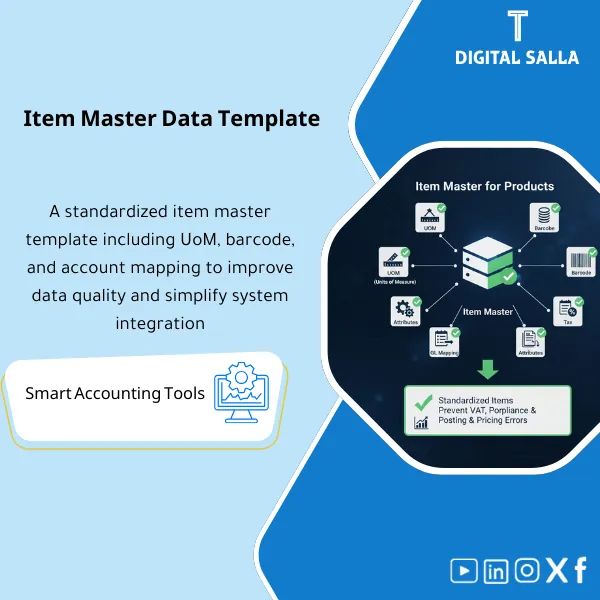
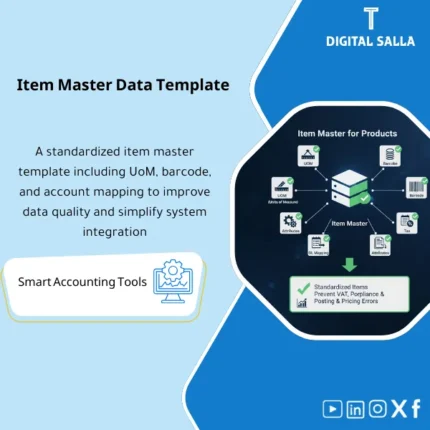
Item Master Template: Captures item data (UOM, barcode, VAT classification, GL mapping, and item attributes such as stock/service). Delivers an ERP-ready item master load file that reduces invoicing, pricing, and inventory posting errors.
“`html
Item Master Template
Subline: Item data template for adjusting UOM/Barcode/Tax/GL Mapping and preparing an Item Master ready for upload to ERP without duplicates or incorrect tax classifications.
Value Proposition: Item Master Template is the file that defines “how inventory, tax, and entries will be calculated” before operations begin. Real-world scenario: a duplicate item with two names, uncontrolled unit of measure (piece/carton without conversion), non-unique barcode, incorrect tax classification, or linking items to GL Mapping accounts that is unclear results in incorrect inventory and COGS entries. The problem later manifests as operational errors: FIFO pricing gets distorted, inventory shows unexplained discrepancies, and VAT is incorrectly calculated on item categories. This product provides you with an Item Master Template in the form of an Excel item data template with validation rules and mandatory field checks: UOM units of measure and their conversions, item barcodes, VAT tax classification for items, and GL mapping, so you end up with a Master Data file that is ready for upload and review before Go-Live and during operations.
In 20 Seconds: What Will You Get?
- Item Master Template ready: mandatory fields + optional fields based on your business nature.
- UOM units of measure: Definition of Base UOM + Units of measure + conversions to prevent inventory discrepancies.
- Item barcodes: Uniqueness check rules + length/format + linking to the item and unit/package.
- VAT tax classification for items: tax class for each item with documentation of reason/internal reference.
- Linking items to GL Mapping accounts: mapping for sales/COGS/Inventory/Returns by group.
- Validation & Duplicates: Duplicate checks (code/name/barcode) + error log for closure.
- Runbook: Steps for preparing, approving, and delivering the file for import.
CTA related to outputs: you will receive Item Master file + Validation rules + UOM conversions + VAT/GL mapping + Duplicates log.
Suitable For
- ERP Implementation / Data Migration: Preparing Master Data before import and preventing errors during upload.
- Inventory/Operations: Standardizing items, units of measure, and barcodes to reduce inventory discrepancies.
- Finance/Tax: Adjusting VAT class and GL mapping to avoid incorrect entries and tax classification.
Not Suitable For
- If your business does not use items/inventory at all (services only without materials/goods) — you will not benefit from the Item Master.
- If you have an Item Master set up within your ERP with creation controls that prevent duplication and enforce UOM/VAT/GL mapping automatically — the value of the template will be lower.
Without Template / With Template (Brief Comparison)
| Item | Without Item Master Template | With Item Data Template |
|---|---|---|
| UOM | Multiple units of measure without conversions → Inventory discrepancies | Documented UOM conversions + error checks before upload |
| VAT/GL | Tax classification and GL mapping done “post-operation” | VAT class + GL mapping set from the start as part of the master |
| Duplication | Duplicate items/non-unique barcodes → Unreliable reports | Duplicates log + rules prevent entry of duplicate items |
Before Use: 5 Symptoms That Item Master Will Create Operational and Accounting Issues
- Items are duplicated because there is no fixed standard for item name/code or uniqueness rules for barcodes.
- UOM units of measure are uncontrolled: selling in cartons and buying in pieces without clear conversion.
- VAT tax classification for items is inconsistent, leading to tax differences on the same type of products.
- Linking items to GL Mapping accounts is done manually in entries or through reclassification at month-end.
- Barcodes are used multiple times or do not match the package/unit, compromising the accuracy of receiving and issuing.
How the Item Master Template Works Practically from Preparation to Import?
The application begins by defining the data structure: what are the item groups? What are the base units? What are the barcode rules? And what is the tax class for each group? Then, the Excel item data template is filled with the minimum mandatory fields, adding UOM units of measure conversions for items sold/bought in different units. After that, validation checks are run: duplicate code/name/barcode, missing values, undefined tax class, and absence of linking items to GL Mapping accounts. Any issues appear in the Duplicates log/Validation report and are resolved before import, then an “Approved for Import” version is issued with a version number and date.
Implementation Method (3 Steps)
Step 1: Preparation and Report Gathering
- Current item list (if any) + current classifications + suppliers/brands (optional).
- Definition of standard units of measure (Base UOM) + sales/purchase units + conversion rules.
- List of internally approved tax classes (VAT) linked to item types.
- Linking item groups to GL accounts: Inventory/COGS/Sales/Returns/Adjustments.
Step 2: Coding + UOM + Barcode + VAT + GL
- Define Item code naming convention (code structure) to prevent duplication.
- Fill in item barcodes with uniqueness rules and link them to the unit/package.
- Fill in VAT tax classification for items at the item or group level.
- Add linking items to GL Mapping accounts by group to reduce misclassification.
- Document any exceptions (special item/special tax treatment) in notes/approval field.
Step 3: Validation + Approved Copy + Delivery for Import
- Run checks for duplicates, missing fields, UOM conversions, and VAT/GL mapping.
- Close errors via Duplicates/Validation log (owner + action + date).
- Issue an Approved for Import copy + save Evidence: rules + mapping + version history.
Product Components (Clear Inventory)
-
Item Master Template (Excel item data template)
- Practical Purpose: A unified Master file for items with mandatory and optional fields.
- When to Use: Before import + when creating new items.
- Resulting Evidence: Reviewable Item master file.
-
UOM Structure & Conversions (UOM units of measure)
- Practical Purpose: Definition of Base UOM and conversions for sales/purchase/pack for each item.
- When to Use: When there is more than one unit for the item.
- Resulting Evidence: UOM conversions map + controls.
-
Barcode Rules & Uniqueness Check (Item barcodes)
- Practical Purpose: Preventing barcode duplication and linking it to the correct package/unit.
- When to Use: Before import and during the addition of new items.
- Resulting Evidence: Barcode validation report + duplicates list.
-
VAT Classification (VAT tax classification for items)
- Practical Purpose: Assigning a tax class for each item/group and establishing the tax treatment.
- When to Use: When creating/modifying an item or changing tax treatment.
- Resulting Evidence: VAT mapping + approval notes for special cases.
-
GL Mapping (Linking items to GL Mapping accounts)
- Practical Purpose: Linking item groups to Inventory/COGS/Sales/Returns/Adjustments accounts.
- When to Use: Before Go-Live and when adding new groups.
- Resulting Evidence: GL mapping table + owner.
-
Validation Rules + Error Log
- Practical Purpose: Detecting missing values, duplication, and logical errors before import.
- When to Use: Before issuing an Approved for Import copy.
- Resulting Evidence: Validation report + closed error log.
-
Deduplication & Naming Convention Guide
- Practical Purpose: Rules for standardizing item names/codes to prevent duplication over time.
- When to Use: During establishment and then as a permanent reference.
- Resulting Evidence: Naming convention + change log.
-
Runbook + Field Definitions
- Practical Purpose: Explaining each column: its source, who fills it, how it is validated, and its impact on operations/accounting.
- When to Use: During preparation and delivery to the ERP/warehouse/tax team.
- Resulting Evidence: Operational guide preventing differing interpretations of fields.
What Should Be Included in the Delivery?
- 01-Item-Master-Template-Pack.xlsx: The main file (template + lookups + validation + reports).
- 02-Item-Master-Template.xlsx: Excel item data template (core columns + optional fields).
- 03-UOM-Conversions.xlsx: UOM units of measure + conversions (base/sales/purchase/pack).
- 04-Barcode-Register.xlsx: Item barcode register + uniqueness rules + linking to the unit.
- 05-VAT-Classification-Mapping.xlsx: VAT tax classification for items (tax class) + approval notes.
- 06-GL-Mapping-Items.xlsx: Linking items to GL Mapping accounts by group (Inventory/COGS/Sales/Returns).
- 07-Lookup-Tables.xlsx: Auxiliary tables (categories/UOM list/tax classes/warehouse groups).
- 08-Validation-Report.xlsx: Validation report (missing fields/invalid values/logic checks).
- 09-Duplicates-Log.xlsx: Duplicates log (code/name/barcode) + closure action.
- 10-Approved-for-Import-Cover.docx: Approval page for the import version (Prepared/Reviewed/Approved + version/date).
- 11-Change-Log.xlsx: Change log on Item master (who/when/why) to prevent master chaos.
- 12-Runbook.pdf: Step-by-step operation (fill → validate → fix → approve → import).
- 13-Field-Definitions.docx: Definition of each field, its source, and its impact on inventory/tax/GL.
- 14-Controls-Checklist.pdf: Control checklist (uniqueness/UOM/VAT/GL mapping approvals).
- 15-Archiving-Map.docx: Master Data file retention tree + naming convention for copies.
After Implementation (Two Points Only)
- Operational Outcome for the Team: Items are created uniformly: code/name/unit/barcode/conversions, reducing item duplication and inventory discrepancies resulting from UOM.
- Control/Audit Outcome: VAT and GL mapping become documented at the master level, thus reducing reclassification at month-end and ensuring classification evidence is available.
FAQ — Questions Before Purchase
Is it suitable for any ERP?
Yes. The structure is general, and columns can be adapted to match your system’s Import template.
Does it support multiple units of measure for the item?
Yes, through UOM conversions (Base/Sales/Purchase/Pack) with validation rules to prevent incorrect conversions.
Does it include item barcodes and duplication check rules?
Yes: Barcode register + uniqueness checks + duplication reports.
Does it cover VAT tax classification for items?
Yes, through VAT classification mapping for each item/group with documentation space for special cases and approval.
Does it include linking items to accounts (GL Mapping)?
Yes: mapping by group to Inventory/COGS/Sales/Returns/Adjustments according to your COA design.
What is the minimum required to fill the template?
Item code + item name + category + base UOM + VAT class + GL mapping group. Barcode and conversions are added as needed.
Does it help prevent future item duplication?
Yes, through naming convention + change log + validation rules that can be used when adding any new item.
Is there an “Approved for Import” version?
Yes, through cover page + versioning to track which version was delivered for import and when.
Ready to Adopt a Clean Item Master that Establishes VAT and GL from the Start?
Outputs: Excel item data template + UOM conversions + barcodes + VAT classification + GL mapping + Validation report.
“`
| المسمّى الوظيفي | |
|---|---|
| Duration | |
| المستوى | |
| التحديثات | |
| القطاع | |
| الصيغة |





Reviews
Clear filtersThere are no reviews yet.