Landed Cost Allocation Model – Excel Template

55.59 $

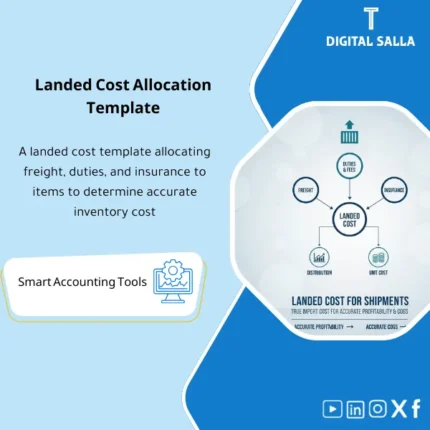
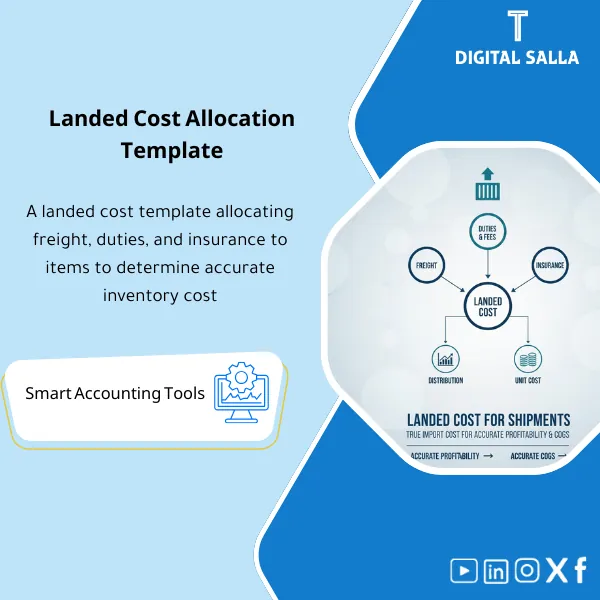
Landed Cost Template: Captures freight, duties, insurance, and other import costs and allocates them to items (by value/weight/volume) to update unit cost. Delivers more accurate inventory valuation and COGS for import and costing teams at month-end.

SKU: DIS116 Category:
Description

Landed Cost Template

Subtitle: Landed Cost Template for aggregating shipping/fees/insurance and distributing shipping costs across items to arrive at the landed cost of the product and evaluate inventory at actual cost (Excel)

Value Proposition: The Landed Cost Template addresses an operational accounting gap that arises with every import: the supplier invoice is recorded at the item cost, while shipping, insurance, and customs fees come with separate invoices and are often expensed in the period—resulting in “misleading” COGS, profit margin, and inventory reports because the landed cost of the product is incomplete. The real scenario starts from PO/Shipment: you receive a shipment containing multiple items, pay for import expenses (Freight/Insurance/Customs/Handling), and then need an auditable method for distributing shipping costs across items and closing them to inventory/COGS based on what has been sold and what remains in stock. This product provides you with Landed Cost Excel that consolidates all cost elements, distributes them across items according to a clear allocation basis (by value/quantity/weight/volume), and outputs the landed cost of the product for each SKU along with a list of entries/adjustments that can be uploaded into the system, thus making inventory valuation at actual cost auditable.

In 20 Seconds: What Will You Get?

  • Shipment Cost Pack to aggregate all shipment invoices (supplier/shipping/insurance/customs/handling).
  • A shipping cost distribution engine with multiple bases (Value/Qty/Weight/Volume).
  • Calculation of product landed cost for each SKU (Unit landed cost).
  • A table of customs fees and import costs with classification and documentation.
  • Outputs for inventory valuation at actual cost instead of just purchase cost.
  • A posting list for closing Clearing accounts and updating inventory/COGS.
  • Sign-off + Assumptions log to document the distribution basis and exchange rate (if applicable).

CTA related to outputs: you will receive Allocation schedule + Landed unit cost + Posting list + Shipment pack.

Suitable For

  • Accounting / Inventory Costing: Loading import expenses to inventory instead of unsubstantiated period expense.
  • Supply Chain: Consolidating the shipment file and documenting the elements of import costs.
  • Finance (Month-End): Closing Clearing accounts and linking costs to inventory/COGS in a traceable manner.

Not Suitable For

  • If your ERP automatically applies landed cost allocation and outputs ready schedules and posting entries — the template will only serve as a verification tool.
  • If there are no clear documents for the shipment (shipping/insurance/customs invoices) or if there is no linkage between the shipment and the received items — the import documentation process needs to be adjusted first.

Without Landed Cost / With Landed Cost (Short Comparison)

Item Without Template With Landed Cost Template
Item Cost Purchase cost only Landed unit cost = purchase + freight + customs + insurance…
Shipping/Customs Expensed as period costs Charged to inventory/COGS based on quantities sold/remaining
Traceability No Allocation schedule Schedule + Basis + Sign‑off + Reconciliation

Before Use: 5 Symptoms That Inventory Cost Is Not “Real”

  • Shipping/insurance/customs are closed as general expenses without linkage to the shipment.
  • Profit margin fluctuates monthly due to loading import expenses in the month invoices arrive.
  • No auditable shipping cost distribution schedule.
  • Clearing or GR/IR account for imports remains open without explanation.
  • Internal/external auditor asks: “How was the product’s landed cost calculated?” and there is no documented file.

How Does the Landed Cost Template Work Practically from Shipment File to Updating Inventory Cost?

The application starts by creating a “Shipment pack” for each shipment: shipment number, arrival date, supplier, and receipt reference (GRN) along with the item list and quantities. Then, the supplier invoice (purchase) is recorded, followed by the recording of import expenses loading: shipping, insurance, customs fees, handling, and any bank or clearance fees according to your policy. Next, you choose a “Basis” for cost distribution: distribution by value (suitable for items with varying prices), by quantity (suitable for similar items), or by weight/volume (suitable for shipping). This results in a shipping cost distribution schedule and calculates the product landed cost per unit for each SKU. Finally, the template outputs a posting list: how to close the shipment cost from expense/clearing accounts to inventory (then to COGS upon sale) with reconciliation proving that the total distribution = total shipment costs.

Application Method (3 Steps)

Step 1: Preparation and Report Collection

  • PO/GRN or list of received items and their quantities for each shipment.
  • Supplier invoice (Purchase invoice) + currency and exchange rate (if applicable).
  • Shipping/insurance/customs/handling invoices + due dates and payment.
  • Define the distribution basis (Value/Qty/Weight/Volume) and document it.

Step 2: Aggregate Costs + Choose Distribution Basis

  • Record each cost item in “Cost buckets” (Freight/Customs/Insurance/Handling…).
  • Document any exceptions: discounts from suppliers, additional fees, exchange rate differences.
  • Run the distribution engine and output the Allocation schedule for each item.

Step 3: Output Landed Cost + Entries/Loading + Close Shipment

  • Output inventory valuation at actual cost: landed unit cost for each SKU.
  • Output posting list to close clearing and update inventory/COGS according to your system.
  • Close the shipment (Closed) with Sign‑off and Reconciliation matching the total.

Product Components (Clear Inventory)

  1. Shipment Header & Item List

    • Practical Purpose: Define the shipment and link it to items and quantities and receipt reference.
    • When to Use: When opening a new shipment file.
    • Resulting Document: Shipment pack header + item list.
  2. Import Costs Capture (Loading Import Expenses)

    • Practical Purpose: Record shipping/insurance/customs/handling, etc., with invoice reference.
    • When to Use: When shipment invoices arrive.
    • Resulting Document: Shipment cost record with supporting documents.
  3. Allocation Engine (Shipping Cost Distribution Across Items)

    • Practical Purpose: Distribute costs according to a specified Basis (Value/Qty/Weight/Volume).
    • When to Use: After completing the recording of shipment costs.
    • Resulting Document: Allocation schedule matching total costs.
  4. Landed Unit Cost Output (Product Landed Cost)

    • Practical Purpose: Calculate landed cost for each SKU at the unit level.
    • When to Use: When updating inventory cost or analyzing margin.
    • Resulting Document: Landed unit cost table.
  5. Customs & Import Duties Sheet (Customs Fees and Import Costs)

    • Practical Purpose: Detail customs fees and link them to the shipment and document them.
    • When to Use: When recording fees and customs declaration.
    • Resulting Document: Customs cost breakdown.
  6. Posting List / Journal Guidance

    • Practical Purpose: Output a list of entries/loading to close the cost from clearing to inventory/COGS.
    • When to Use: Within Month-End or when closing the shipment.
    • Resulting Document: Auditable posting list.
  7. Reconciliation & Variance Checks

    • Practical Purpose: Verify that total distribution = total shipment costs, and reveal any variances.
    • When to Use: Before approval and closing the shipment.
    • Resulting Document: Reconciliation report + variance notes.
  8. Assumptions Log + Sign‑off

    • Practical Purpose: Document the distribution basis and exchange rate and any exceptions and approve them.
    • When to Use: For every shipment.
    • Resulting Document: Traceable approval trail.

What Should Be Included in the Delivery?

  • 01-Landed-Cost-Pack.xlsx: The main file (Shipment + Costs + Allocation + Outputs).
  • 02-Shipment-Header.xlsx: Shipment data + references (PO/GRN/Invoice).
  • 03-Item-List.xlsx: List of items and quantities and unit of measure.
  • 04-Import-Costs-Capture.xlsx: Loading import expenses (Freight/Insurance/Customs/Handling…).
  • 05-Customs-Duties.xlsx: Customs fees and import costs + reference documents.
  • 06-Allocation-Engine.xlsx: Shipping cost distribution engine (Value/Qty/Weight/Volume).
  • 07-Landed-Unit-Cost.xlsx: Landed cost for each SKU.
  • 08-Reconciliation-Checks.xlsx: Matching total costs with total distribution + variances.
  • 09-Posting-List.xlsx: List of entries/loading to close clearing and update inventory/COGS.
  • 10-FX-Table.xlsx: Exchange rate table (if the shipment is in a different currency).
  • 11-Assumptions-Log.xlsx: Documenting basis for distribution and any exceptions.
  • 12-Signoff-Page.docx: Prepared/Reviewed/Approved for closing the shipment.
  • 13-Runbook.pdf: Step-by-step run from opening the shipment to closing it.
  • 14-Archiving-Map.docx: Tree structure for archiving the shipment file (invoices/distribution/approvals).
  • 15-Policy-Note.pdf: Brief policy memo: what is charged to cost and what is considered a period expense.

After Implementation (Two Points Only)

  • Operational Outcome for the Team: Each shipment has a unified cost file, and clear distribution across items instead of differing treatments between users.
  • Control/Audit Outcome: Landed cost is traceable: total shipment costs = total distribution + documented distribution basis + approval signatures.

FAQ — Questions Before Purchase

What is the best basis for distributing shipping costs across items?

Depending on the nature of the shipment: by value for items with varying prices, by weight/volume for shipments that depend on weight/volume, and by quantity for similar items.

Does it include customs fees and insurance?

Yes: there are sections for recording customs fees and import costs, insurance, handling, and more.

Is it suitable for any ERP?

Yes, provided that the ERP allows uploading landed cost as an additional cost upon receipt or through a GL entry that increases inventory cost.

Can it be used with multiple shipments?

Yes: a Shipment pack is opened for each shipment and closed independently with sign-off.

What is the minimum data required?

A list of items and quantities received + total shipping/fees/insurance costs + a clear distribution basis.

How do I handle exchange rate differences?

There is an FX table and documentation of assumptions; FX differences can be isolated as a separate item or included according to your policy.

Does it help in evaluating inventory at actual cost?

Yes, because it adds import expenses to the unit cost and outputs the landed unit cost for each SKU.

Is there a delivery template for references?

Yes: shipment pack + allocation schedule + reconciliation + sign-off + document archiving map.

Ready to close import expenses to inventory instead of unlinked period expenses?

Outputs: Allocation schedule + landed unit cost + reconciliation + posting list + sign-off.

Additional information
المسمّى الوظيفي
Duration

المستوى
التحديثات
القطاع
الصيغة
Reviews (0)
0 reviews
0
0
0
0
0

There are no reviews yet.

Be the first to review “Landed Cost Allocation Model – Excel Template”

Your email address will not be published. Required fields are marked *