


Material Issue/Return & Scrap – Excel Template
55.59 $
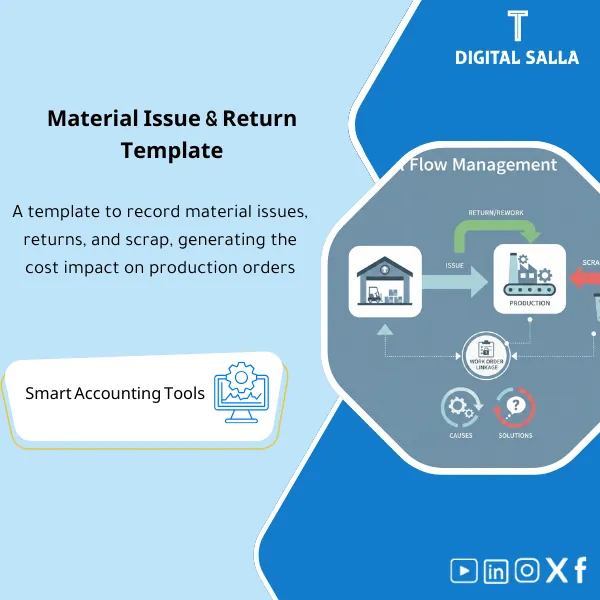
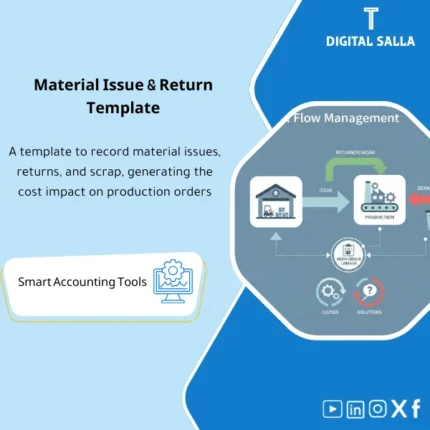
Production Material Issue/Return Log: Records raw material issues/returns to production orders, documents scrap and causes, and links to warehouse and BOM lines. Delivers actual consumption and scrap reporting to control unit cost and usage variances.
Material Issue
Material Issue/Return template on Excel for recording issues + returns + scrap and linking consumption to the production order, producing traceable Month-End evidence.
Value Proposition: Your Material Issue should not remain as a “general warehouse issue” without a clear link to production; this template transforms issues, returns, and scrap into a single record linked to the Production Order and provides you with a summary of material consumption tracking suitable as evidence for closing and auditing.
In 20 seconds: What will you get?
- Material Issue Template: Record of raw material issues for production at the level of Production Order/Batch with document reference.
- Material Return Template: Record of raw material returns linked to the same order to reduce inflated consumption.
- Scrap Register: Material scrap with reason + approval + its impact on consumption.
- Summary of material consumption tracking: Actual Net consumption (Issue – Return – Recoveries) by order/item.
- Optional deviation sheet: BOM/Standard vs Actual to explain increased consumption instead of “general variances.”
- Matching tab: Tie-out between issue/return movements and Inventory Ledger (Book vs Movement).
- Exceptions + Sign-off: Orders without documents / Scrap without approval / Returns without reference.
Delivery is linked to the button: Issue + Return + Scrap + Consumption Summary + Tie-out + Exceptions Pack.
Suitable for
- Cost Accountant / Manufacturing: Wants material consumption linked to WIP/COGM and to explain variances.
- Warehouse / Storekeeper: Needs a unified material issue and return template instead of multiple “ledgers.”
- Production Controller: Wants to monitor issues against production and identify orders consuming above normal.
Not Suitable for
- If there is no numbering for production orders/batches and no issue/return documents—this template will not create non-existent evidence.
- If you need a complete Factory Operating System/Barcode—this is not an MES; it is an accounting/monitoring template for tracking.
Without the template / With Material Issue/Return Template
| Item | Without the Template | With the Template |
|---|---|---|
| Raw Material Issues | General warehouse issues not linked to the order or product | Issue Log linked to Production Order + document reference |
| Raw Material Returns | Returns lost within warehouse movements | Return Log deducts Net consumption and shows return reason |
| Material Scrap | Unrecorded scrap… appears only as increased consumption | Scrap Register with reason/approval + clear impact on consumption |
| Month-End Tie-out | WIP/COGM variances without explanation | Tie-out between Movements and Inventory Ledger + Exceptions |
Before Use: 5 Symptoms that Issues and Returns are “Not Holding” Accountably
- Material consumption exceeds expectations with no explanation other than “production is like that.”
- Raw material returns actually occur but do not appear as deductions from consumption at Month-End.
- Material scrap is recorded verbally… then turns into variances in inventory or WIP.
- When reconciling inventory: Book vs Physical shows variances and you don’t know if they are issues/returns/damaged.
- There is no single file linking the production order to material movements and their documents.
How does Material Issue work in practice?
The idea is not just “recording issues”; it is transforming every material movement into an audit trail:
Issue → Return → Scrap
then producing Net consumption and linking it to the production order and inventory ledger.
This way, material consumption tracking becomes explainable in closing and auditing.
Implementation Method (3 Steps)
Step 1: Preparation and Report Gathering
- Production Order List: Order number, product, operation date, status.
- Item Master + UOM + Warehouses/Locations.
- Daily movement documents: Issue Slip / Return Note / Scrap Form (or ERP references).
- Inventory Ledger or Movement Report from the system (for reconciliation at period-end).
Step 2: Recording Issues + Returns + Scrap and Reconciliations
- Record Raw Material Issues and link to the production order (Order/Batch) + document reference.
- Record Raw Material Returns on the same order to adjust Net consumption.
- Record Material Scrap with reason and approval (if required by policy).
- Run Validation: Orders without reference, items without UOM, negative quantities, scrap without approval, returns without original issue.
Step 3: Produce Net Consumption + Link to Closing (Month-End)
- Produce Net Consumption by order/item/warehouse (Issue – Return – Recoveries).
- Perform Tie-out between total movements and Inventory Ledger report (Book vs Movements).
- Prepare Month-End Evidence Pack: Consumption summary + Scrap Register + Closed/Open Exceptions + Sign-off.
Product Components (Clear Inventory)
-
Material Issue Log (Material Issue Template)
- Practical Purpose: Record every material issue for the order/Batch with warehouse, UOM, and document reference.
- When to Use: Daily during operations or when issuing materials to the line.
- Resulting Evidence: Issue Register + References (Issue Slip/ERP Doc No).
-
Material Return Log (Material Return Template)
- Practical Purpose: Record raw material returns linked to previous issues to correct Net consumption.
- When to Use: When returning unused materials or returns from the line.
- Resulting Evidence: Return Register + Link to Original Issue.
-
Scrap / Waste Register (Material Scrap)
- Practical Purpose: Separate “scrap” from “consumption” to distinguish the reason (Reject/Spillage/Expiry/Handling).
- When to Use: When scrap occurs or when approving destruction/damage linked to a production order.
- Resulting Evidence: Scrap Evidence + Reason + Approver.
-
Net Consumption Summary (Material Consumption Tracking)
- Practical Purpose: Produce Net consumption by order/item/period.
- When to Use: End of day for reporting + end of month for closing.
- Resulting Evidence: Consumption by Order / Item Report.
-
BOM / Standard vs Actual (Optional)
- Practical Purpose: Explain variances: increased consumption, high scrap, or unrecorded returns.
- When to Use: Weekly review or when analyzing margin/COGM variances.
- Resulting Evidence: Variance Summary + Drivers.
-
Tie-out & Exceptions + Sign-off
- Practical Purpose: Reconcile movements with Inventory Ledger and show gaps before Month-End.
- When to Use: Weekly + before monthly closing.
- Resulting Evidence: Reconciliation + Exceptions Log + Sign-off.
What should be included in the delivery?
- Main Excel File with tabs: Issue Log / Return Log / Scrap Register / Item & UOM / Orders(Batch) / Summary / BOM vs Actual (optional) / Tie-out / Exceptions / Sign-off.
- Printable Forms (optional based on your use): Issue Slip and Return Note and Scrap Form as a Cover Sheet for document archiving.
- Input and Verification Rules: Mandatory fields + Validation Rules (document reference, UOM, linking order… etc.).
- Ready Outputs: Consumption Summary + Scrap Summary + Exceptions View + Month-End Evidence View.
- Proposed Archiving Structure: Daily Movements / Approved Scrap / Month-End Tie-out / Signed-off Versions.
After Implementation (Only Two Points)
- Operational Result for the Team: Any issue/return/scrap becomes immediately visible by order—so you know where consumption is rising before it appears as variances at month-end.
- Control/Audit Result: You have a single record linking the movement to the document and to the production order and reconciling with the Inventory Ledger—ready as an Evidence Pack for review.
FAQ — Questions Before Purchase
Does the Material Issue Template work with any ERP?
Yes. The template is standalone and relies on entering/importing movements (Issue/Return/Scrap) from ERP or recording them manually with Doc Reference.
Does it support multiple warehouses and locations?
Yes. There are Warehouse/Location fields and it can aggregate by location, which is important when issuing from a central warehouse to supply multiple lines.
Is it required to have Production Orders or BOM?
For best results: Yes, having Order/Batch is key for tracking. BOM is optional (for analyzing Standard vs Actual variances) but not a requirement for basic recording.
How does it handle material scrap?
There is a separate Scrap Register: quantity + reason + reference + approval. This separates scrap from normal consumption and prevents “general variance explanations.”
Does it support UOM and unit conversions?
It supports recording UOM for each movement. If you have conversions (Kg ↔ g / Box ↔ Piece) you can set conversion rules within the Item/UOM tab according to company policy.
What is the minimum data required to get started?
Document/Reference number + Order/Batch + Item + Qty + UOM + Warehouse + Date. Without a document reference, the record will not be auditable.
Does it automatically generate accounting entries?
The template does not post entries automatically within ERP. However, it produces a Net consumption summary that can be used for WIP/COGM reconciliations or for reviewing recorded issue entries in the system.
Is it suitable for Job Order and Process Manufacturing?
Yes. In Job Order, you use Order No, and in Process, you use Batch/Run. The idea is the same: linking the movement to a traceable operating unit.
If you want Net material consumption linked to the order and inventory ledger
Outputs: Raw Material Issues + Raw Material Returns + Scrap + Material Consumption Tracking + Tie-out + Exceptions + Sign-off.
| المسمّى الوظيفي | |
|---|---|
| Duration | |
| المستوى | |
| التحديثات | |
| القطاع | |
| الصيغة |





Reviews
Clear filtersThere are no reviews yet.