




Vendor Master Data Template – Excel Template
42.29 $
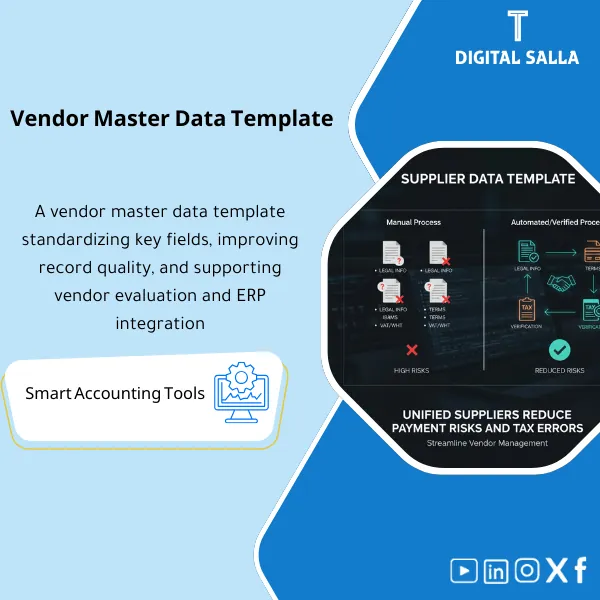
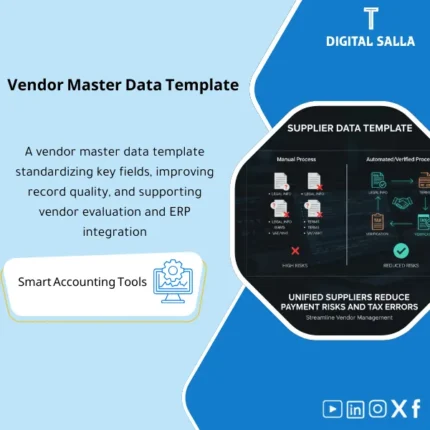
Vendor Master Data Template: Captures IBAN, VAT/WHT, payment terms, and classification with duplicate checks and mandatory fields before creation. Delivers an ERP-ready Vendor Master that reduces payment risk and tax setup errors.
Vendor Master Data Template
Vendor Master Data Template for managing vendor data, IBAN, WHT, and vendor classification — with controls to prevent duplicate vendors and an Audit Trail for modifications.
Value Proposition: The Vendor Master Data Template is not just an “input sheet.” It serves as a control point to prevent costly operational and compliance issues: a duplicate vendor under a different name, an incorrect IBAN causing payments to the wrong account, incomplete tax data affecting WHT data for vendors, or an unclassified vendor making procurement and risk reports unclear. This template standardizes Vendor Master Data: mandatory fields, validation rules, and a clear methodology for creating/modifying vendors with a traceable audit trail.
In 20 Seconds: What Will You Get?
- Standardized Vendor Master Data: Standard fields for each vendor (ID, address, accounts, payment terms).
- Excel Vendor Template: Ready for download and migration to ERP (with mapping for common fields).
- Vendor IBAN Data: With validation rules + IBAN modification log + supporting attachments.
- Vendor WHT Data:: WHT/Tax residency/service type classification (as per your company policies) to support withholding.
- Vendor Classification:: Category/Risk/Supply type/Domestic-International to support procurement and compliance reports.
- Prevent Duplicate Vendors:: Duplicate checks (name/record/phone/IBAN) + list of candidates for duplication.
- Audit Trail:: Change log + Approval fields (Requested by/Reviewed by/Approved by/When) for sensitive data.
CTA related to outputs: You will receive Vendor Master Template + Validation + Duplicate Checks + IBAN Change Log ready.
Suitable For
- AP / Treasury: Managing payment data (IBAN/Bank) and reducing transfer errors and bank returns.
- Procurement / Vendor onboarding: Standardizing the vendor file before the first PO/first invoice.
- Compliance / Internal Audit: Tracking modifications to sensitive data and preventing changes without approvals.
Not Suitable For
- If you want a Vendor Portal system with direct bank integration and automated verification—this is a Master data template, not a platform.
- If there are no approval permissions/Workflow within your company for modifying IBAN—you will first need to establish responsibilities (Data owner/approver).
Without the Template / With the Template (Short Comparison)
| Item | Without Vendor Master Data Controls | With Vendor Master Data Template |
|---|---|---|
| IBAN | Modifying IBAN via WhatsApp/Email without a record | Mandatory fields + Change log + Approvals + Attachments |
| Duplication | Vendor duplicated → scattered invoices/balances | Duplicate checks + Checklist before creation |
| WHT/Tax | Incomplete data → incorrect withholding or dispute | Tax fields and classification + Evidence + Review |
Before Use: 5 Symptoms That Vendor Master Data Causes Payment and Compliance Issues
- Presence of a duplicate vendor with multiple codes due to variations in name spelling (Arabic/English) or different registration numbers.
- Modifying Vendor IBAN Data without a clear record or attachments (Bank letter/IBAN certificate).
- Lack of vendor classification (Domestic/International/Service/Goods) makes procurement reports and risk analysis inaccurate.
- Incomplete WHT data for vendors leads to incorrect withholding or payment delays due to repeated reviews.
- No Workflow clarifying: Who requested the vendor creation? Who reviewed? Who approved? And when were the data changed?
How the Vendor Master Data Template Works Practically from Onboarding to Payment?
The journey begins with a request to create/modify a vendor, followed by entering data into the Vendor Master Data template according to mandatory fields. Then, duplication checks (name/record/phone/IBAN) are performed before issuing the Vendor code. Next, bank and tax data are reviewed, and evidence (IBAN certificate/Tax docs) is attached and approved. At Month-End, a change log can be extracted along with a list of “incomplete” vendors to prevent the approval of invoices/payments based on incomplete data.
Implementation Method (3 Steps)
Step 1: Preparation and Gathering Reports
- Identify Data owner and Approver for vendor data (especially IBAN and tax data).
- Gather minimum requirements: legal name, registration/ID number, address, contact, payment terms, bank/IBAN data, VAT/WHT data (as per activity/country).
- Define Tax & WHT mapping: type of service/good, residency, and type of document required for each case.
Step 2: Verification + Preventing Duplication + Change Log
- Run Duplicate checks: matching vendor name (Arabic/English) + registration number + phone number + email + IBAN.
- Apply Validation rules: IBAN format, field completeness, ID number formatting, mandatory document attachments.
- Record any sensitive modification (IBAN/Tax status/Payment terms) in the Change log with reason, reference, and approval.
Step 3: Migration to ERP + Compliance Reports + Month-End Pack
- Prepare Vendor master migration file for ERP (mapping for common fields) after data approval.
- Generate compliance reports: Vendors incomplete, Duplicate candidates, IBAN changes, Vendors without tax classification.
- Compile Month-End master data pack: snapshots + change log + exceptions + sign-off.
Template Components (Clear Inventory)
-
Vendor Master Data Template
- Practical Purpose: A unified record for all vendor data (Legal/Contact/Payment/Tax/Bank).
- When to Use: When adding a new vendor or updating their data.
- Resulting Evidence: Complete vendor profile ready for ERP migration.
-
Vendor Classification
- Practical Purpose: Classifying the vendor (Domestic/International, Service/Goods, Risk level, Spending category).
- When to Use: When creating the vendor + periodic review to enhance reports.
- Resulting Evidence: More accurate spending and risk reports + supporting WHT mapping.
-
IBAN & Bank Details Section
- Practical Purpose: Standardizing bank and IBAN data and linking it with supporting documents + validation rules.
- When to Use: Before the first payment + whenever data changes.
- Resulting Evidence: Bank details record + IBAN change log + Approval trail.
-
WHT/Tax Data Section
- Practical Purpose: Collecting and classifying withholding data (WHT) or tax residency and service type to support correct withholding.
- When to Use: During onboarding + before any payment subject to withholding.
- Resulting Evidence: Tax classification + supporting docs list ensuring consistency.
-
Duplicate Prevention Checks
- Practical Purpose: Identifying candidates for duplication using keys (name/record/phone/email/IBAN).
- When to Use: Before creating a new Vendor + monthly review.
- Resulting Evidence: Checklist + Merge/Reject decisions with justifications.
-
Validation Report
- Practical Purpose: Highlighting missing fields or formatting errors or sensitive data without attachments.
- When to Use: Daily during onboarding + Week‑4 before closing.
- Resulting Evidence: “Incomplete” list preventing invoice entry on unready Vendor.
-
Change Request + Change Log
- Practical Purpose: Documenting requests for Master Data modifications (especially IBAN/Tax/Payment terms) with approval and date.
- When to Use: For any modification of sensitive data.
- Resulting Evidence: Audit trail proving who requested/reviewed/approved and why.
-
Month‑End Master Data Pack
- Practical Purpose: Monthly governance delivery: IBAN changes, incomplete vendors, potential duplications, exceptions.
- When to Use: Month‑End and Quarter‑End.
- Resulting Evidence: Compliance file that can be attached within the Closing Pack or internal audit file.
What Should Be Included in the Delivery?
- 01-Vendor-Master-Data-Template.xlsx: Vendor Master Data (Legal/Contact/Payment/Tax/Bank).
- 02-Vendor-Classification.xlsx: Vendor classification + categories + risks + spending mapping.
- 03-IBAN-Bank-Details.xlsx: Vendor IBAN data + validation rules + required attachments.
- 04-WHT-Tax-Data.xlsx: Vendor WHT data + Tax residency + type of service/good.
- 05-Duplicate-Checks.xlsx: Preventing duplicate vendors + duplicate candidates + decision (Merge/Reject).
- 06-Validation-Report.xlsx: Report of missing fields/errors + Vendors incomplete queue.
- 07-Change-Request-Form.xlsx: Change request form for Master Data + reason + attachments + approval.
- 08-Change-Log.xlsx: IBAN/Tax/Payment terms change log + date + Approved by.
- 09-Evidence-Index.xlsx: Attachments index (IBAN certificate/Tax docs/Commercial registration) + links.
- 10-MonthEnd-MasterData-Pack.xlsx: Summary of monthly changes + exceptions + sign-off.
- 11-Runbook.pdf: Practical run (Onboarding → validation → approvals → ERP upload → month-end reporting).
- 12-Archiving-Map.docx: Retention tree (MasterData/Vendors/Requests/Evidence) + Naming convention.
- 13-Signoff-Page.docx: Prepared/Reviewed/Approved + scope of the period.
After Implementation (Two Points Only)
- Operational Outcome for the Team: Vendor onboarding becomes a clear path: complete data + verification + approvals + migration; thus reducing pending invoices due to data shortages and minimizing payment errors due to IBAN.
- Compliance/Audit Outcome: Any modification to sensitive data (IBAN/Tax/WHT/Payment terms) has a Change request + Approval + Evidence, with reports on duplication and Incomplete vendors that can be easily reviewed.
FAQ — Questions Before Purchase
Is the template suitable for any ERP system?
Yes. It can be used as a migration template (Upload) or as a governance file over the system. The key is mapping the fields according to your ERP.
Does it support only IBAN or complete bank data?
It supports complete bank data (Bank name, Branch, SWIFT/Code if needed) with Vendor IBAN Data as a sensitive field with change controls.
How does it prevent duplicate vendors?
Through Duplicate checks on multiple keys: name (Arabic/English) + registration/ID number + phone/email + IBAN, followed by a record of Merge/Reject decisions.
Does it include WHT data for vendors?
Yes, through the WHT/Tax section to gather the classification and necessary data to support correct withholding (as per your company policy and vendor’s country).
What is the minimum data required to get started?
Legal name + registration/ID number + address + contact + payment terms + IBAN/Bank details + preliminary classification. WHT/VAT data will be completed based on the type of vendor.
Is there a Workflow for approvals?
There is a Change request structure + approval fields within the template (Requested/Reviewed/Approved). The practical implementation of approvals depends on company policy.
Can it be used in an ERP data migration project?
Yes. It is suitable as a Vendor Master Data template before Go‑Live, and with a Change log after launch to manage modifications and maintain data quality.
Is the template a substitute for a complete Master Data Governance system?
No. However, it establishes a strong foundation: standard fields, verification, duplicate prevention, and change logs—essential elements for any data governance.
Ready to Prevent Duplicate Vendors and Manage IBAN Before It Becomes a Payment Error?
Outputs: Vendor Master Data + IBAN controls + WHT fields + Duplicate checks + Change log.
| المسمّى الوظيفي | |
|---|---|
| Duration | |
| المستوى | |
| التحديثات | |
| القطاع | |
| الصيغة |



Reviews
Clear filtersThere are no reviews yet.