


Warehouse/Location/Bin Template – Excel Template
42.29 $
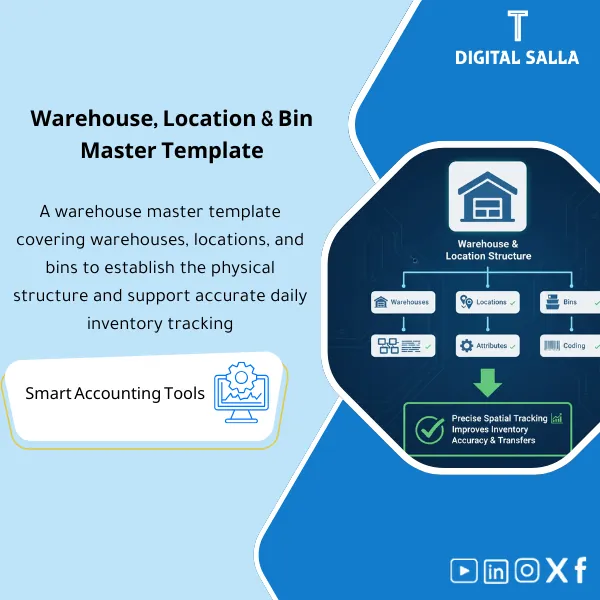
Warehouse Master Data Template: Defines warehouses, locations, and bins with coding, putaway/pick rules, quarantine settings, and location permissions. Delivers a traceable site structure for counting, transfers, and inventory control in ERP.
Warehouse Data Template
Subline: Structuring Warehouses/Locations/Bins and coding them, and preparing the warehouse setup file in ERP with the Bin Locations Template to prevent errors in receiving, issuing, and inventory.
Value Proposition: The Warehouse Data Template defines “where inventory lives” within the system before movement begins. Real-world scenario: warehouses opened with duplicate names, undefined locations, unstandardized bins, or inconsistent coding across branches; the result is daily operational errors: receiving at the wrong location, issuing from a non-existent bin, inventory that cannot be matched because locations do not reflect reality, and inventory reports become unreliable. This product provides you with a structured Warehouses Locations Bins operation in Excel format: defining warehouses, locations, and bins with warehouse coding and naming convention rules, resulting in a downloadable Master Data file within warehouse setup in ERP and making inventory location management traceable and controllable.
In 20 Seconds: What Will You Get?
- Warehouses Locations Bins: Ready warehouse/location/bin data templates.
- Warehouse Location Structure: Zone/Location design that matches operational reality (Receiving/Storage/Returns/Damaged).
- Warehouse Coding: Consistent naming convention + coding rules for all branches.
- Bin Locations Template: Bin structure (aisle/rack/level) + duplication prevention rules.
- Warehouse Setup in ERP: Approved for Import version ready for delivery to the system team.
- Inventory Location Management: Rules to enable/disable locations, types of locations (Sellable/Quarantine/Damaged).
- Validation: Duplicate/logic checks (bin under location under warehouse) + error reports.
CTA related to outputs: You will receive Warehouse/Location/Bin masters + Coding map + Validation + Approved for Import.
Suitable For
- ERP/WMS Implementation: Preparing Master Data for Warehouses/Locations/Bins before upload.
- Warehouse Operations: Establishing storage locations and reducing errors in receiving, issuing, and inventory.
- Finance/Inventory Control: Improving traceability of inventory and linking discrepancies to specific locations.
Not Suitable For
- If you have a WMS configured to enforce location creation and automatically generate bin codes with internal validation — the template will only be an additional layer.
- If an engineering design for the layout (spaces/dimensions/shelves) is required — this is outside the scope of the Master Data template.
Without Structure / With Structure (Brief Comparison)
| Item | Without Warehouse Data Template | With Warehouse Data Template |
|---|---|---|
| Locations and Bins | Non-standardized locations + random bins | Warehouse location structure + Bin Locations Template with fixed coding rules |
| Operational Errors | Receiving/issuing at wrong locations → inventory discrepancies | Validation prevents duplication and establishes relationships (Warehouse→Location→Bin) |
| Import to ERP | Uploading disparate data without an approved version | Approved for Import version + Coding map + Change log |
Before Use: 5 Symptoms That Warehouse Locations Will Cause Discrepancies and Reject Operations
- No unified warehouse coding, leading to repeated names across branches and difficulty in generating reliable reports.
- Warehouse location structure not representative of reality (no Receiving/Quarantine/Damaged zones).
- Bins created manually without rules, leading to duplicates or “impossible” bins (bin without location).
- Receiving/issuing operations fail or are recorded at generic “Default” locations, losing traceability.
- Inventory cannot be analyzed by location because locations are not fixed or not actively used.
How the Warehouse Data Template Works Practically from Design to Warehouse Setup in ERP?
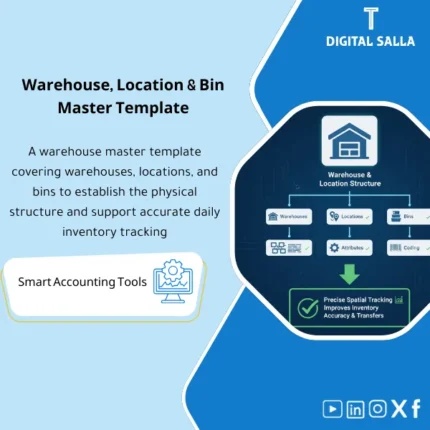
The application begins by defining storage levels: (1) Warehouse at the site/branch level, (2) Locations as functional Zones (Receiving/Storage/Picking/Returns/Quarantine/Damaged), and then (3) Bins as precise storage spaces within each location. Next, warehouse coding rules and coding for locations and bins are established (e.g., WH‑Riyadh / ZN‑Receiving / BIN‑A01‑R02‑L03). Then, the templates are filled, and validation checks are run: preventing duplication, verifying relationships (bin belongs to location belongs to warehouse), and location statuses (Active/Inactive/Restricted). Finally, an Approved for Import version is issued and delivered to the warehouse setup team in ERP, along with a Change log to prevent manipulation of the structure post-launch.
Implementation Method (3 Steps)
Step 1: Preparation and Report Gathering
- List of branches/geographical locations + number of warehouses per location.
- Types of warehouses (Raw materials/Finished products/Spare parts/Returns) according to your activity.
- Required operational zones: Receiving/Put-away/Picking/Shipping/Returns/Quarantine/Damaged.
- Bin logic (aisle/rack/level) if you want structural coding.
Step 2: Designing Structure + Coding + Bin Locations
- Defining warehouse location structure as functional Zones.
- Creating a Bin Locations Template for each Zone according to clear logic (Aisle/Rack/Level).
- Applying warehouse coding and standard coding for locations and bins.
- Defining location properties (Sellable/Non-sellable/Quarantine) to apply movement controls.
Step 3: Validation + Approval + Import Version
- Running checks for duplication and consistency (Warehouse→Location→Bin) and ensuring no orphan bins exist.
- Closing errors via Validation/Duplicates log (Owner + Action + Date).
- Issuing an Approved for Import version and delivering it to the ERP/WMS team with the Coding map.
Product Components (Clear Inventory)
-
Warehouse Master Template
- Practical Purpose: Defining warehouses (Warehouse code/name/site/type/status).
- When to Use: Before setup in ERP and when opening a new warehouse.
- Resulting Guide: Approved warehouse master file.
-
Locations/Zones Template (Warehouse Location Structure)
- Practical Purpose: Defining Zones within each warehouse (Receiving/Storage/Picking/Returns/Quarantine).
- When to Use: When designing operations or restructuring the warehouse.
- Resulting Guide: Locations master + status & type controls.
-
Bin Locations Template
- Practical Purpose: Defining bins within each location with structural coding (aisle/rack/level) and preventing duplication.
- When to Use: When activating bin management or increasing capacity.
- Resulting Guide: Bin master file + validation.
-
Warehouse Coding (Naming & Coding Convention)
- Practical Purpose: Naming rules that prevent code duplication and facilitate reporting.
- When to Use: During establishment and then as a permanent reference.
- Resulting Guide: Coding map + examples.
-
ERP Setup Mapping (Warehouse Setup in ERP)
- Practical Purpose: Translating the structure into an import-ready format according to your system.
- When to Use: Before upload/Go‑Live.
- Resulting Guide: Approved for Import version.
-
Validation Rules + Duplicates/Errors Log
- Practical Purpose: Preventing duplication and conflicts (bin without location, location without warehouse, duplicate codes).
- When to Use: Before approval and import.
- Resulting Guide: Validation report + closed with reasons.
-
Change Control Log
- Practical Purpose: Controlling any changes to locations/bins after launch (who/why/approval).
- When to Use: After Go‑Live to avoid location chaos.
- Resulting Guide: Approved change log.
-
Runbook + Field Definitions
- Practical Purpose: Explaining columns, data sources, and decision ownership (Ops/ERP/Finance).
- When to Use: During preparation, delivery, and implementation.
- Resulting Guide: Operating guide that reduces interpretation discrepancies of locations.
What Should Be Included in the Delivery?
- 01-Warehouses-Locations-Bins-Pack.xlsx: The master file (masters + validation + reports).
- 02-Warehouse-Master.xlsx: Warehouse data (code/name/site/type/status).
- 03-Locations-Zones-Master.xlsx: Warehouse location structure (zones/locations) + types.
- 04-Bin-Locations-Template.xlsx: Bin Locations Template (aisle/rack/level) + rules.
- 05-Coding-Convention.docx: Warehouse and location coding + examples.
- 06-ERP-Import-Mapping.xlsx: Warehouse setup in ERP (column mapping according to the system).
- 07-Validation-Report.xlsx: Validation report (duplicates/logic/invalid status).
- 08-Duplicates-Errors-Log.xlsx: Log of errors/duplicates + owner + closure.
- 09-Approved-for-Import-Cover.docx: Cover page for the approved import version (Prepared/Reviewed/Approved + version/date).
- 10-Change-Control-Log.xlsx: Change control log after Go‑Live.
- 11-Field-Definitions.docx: Field definitions, their sources, and responsible parties.
- 12-Runbook.pdf: Step-by-step operation (design → code → fill → validate → approve → import).
- 13-Controls-Checklist.pdf: Control checklist (uniqueness/structure/activation/restrictions).
- 14-Archiving-Map.docx: Master Data retention tree + naming convention for copies and versions.
After Implementation (Two Points Only)
- Operational Result for the Team: Receiving, issuing, and inventory are conducted at real and coded locations and bins, reducing input errors and “Default location” operations.
- Control/Audit Result: Inventory discrepancy analysis becomes possible by location/bin, and structural changes are subject to Change control.
FAQ — Questions Before Purchase
Is it suitable for any ERP/WMS?
Yes. The columns are adapted to match your system’s import template, while the structure (Warehouse→Location→Bin) remains fixed.
Is bin management required to be activated?
No. You can use it at the Warehouse/Location level only, then add bins later if desired.
Does it cover warehouse and location coding?
Yes: There is a Naming & Coding convention with editable examples according to branches.
Does it assist in managing inventory locations like Quarantine/Damaged?
Yes, through type/status for locations to determine sellable vs non-sellable and apply movement controls.
What is the minimum data required to get started?
A list of locations/branches + warehouse names + envisioned operational zones (Receiving/Storage/Shipping/Returns). Bins are optional depending on the level of detail.
Is there an Approved for Import version?
Yes, with a cover page and versions to control which version was delivered for upload.
Does it include validation to prevent duplication?
Yes: Duplicate checks and structural consistency (bin under location under warehouse) + error log for closure.
Does it include change control after launch?
Yes: Change control log to document any modifications to locations/bins and who approved them and why.
Ready to Structure Locations and Prevent “Default Location” Discrepancies Before Go‑Live?
Outputs: Warehouses/Locations/Bins master + warehouse coding + validation + approved for import.
| المسمّى الوظيفي | |
|---|---|
| Duration | |
| المستوى | |
| التحديثات | |
| القطاع | |
| الصيغة |


Reviews
Clear filtersThere are no reviews yet.