




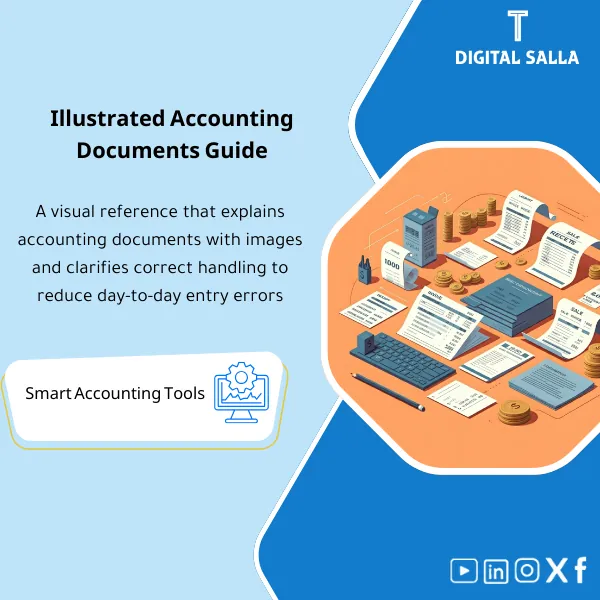
Accounting Documents Visual Guide – PDF Files + Images
127.39 $
Key Accounting Documents (with Images): A practical visual guide to reading, understanding, and using the most common accounting documents—highlighting key figures and the correct accounting treatment for effective financial management.
Accounting Documents
Subtitle: Image Library + Document Linking Guide + Acceptance and Archiving Rules — for delivering Month-End reviewable evidence
Value Proposition: Accounting Documents are the “evidence” that supports the entry: without a correct, acceptable, and archived document, any entry becomes contestable during the audit or causes delays in closing when attachments are requested. This product combines images of key documents (real-life examples) + a step-by-step handling method within the accounting cycle: how to receive the document, how to verify its completeness, how to assign it a Reference ID, and how to link it to the JE Log so that it transforms into a Supporting Pack ready for delivery.
In 20 seconds: What will you get?
- Image Library for key documents: examples of “document format” and what should be visible in it.
- Document Acceptance Rules (Acceptance Criteria): mandatory fields + common errors + when a document is rejected.
- Document Index: a record linking (Reference ID → Document Type → Process → Archiving Link → Related Entry).
- JE Support Map: a map of “which documents support which type of entry” (Revenue/Expense/Accrual/Prepaid/Bank).
- Exceptions Log: log of exceptions (missing/duplicate/unapproved document) + Owner + Closure Date.
- Archiving Structure (Folder Tree) + Naming Convention to standardize evidence storage within the month.
- Delivery Template Evidence Pack: what is delivered at Month-End (with Sign-off).
CTA related to outputs: Receive Document Index + Acceptance Checklist + JE Support Pack ready for use and closing.
Suitable for
- Chief Accountant / GL: wants to consistently link entries to documents to reduce audit requests during Month-End.
- AP/AR + Treasury: wants clear rules for accepting invoices/receipts/bank statements and linking them to the payment/collection record.
- Internal Audit / Controls: wants a testable Evidence Pack: Document → Reference → Entry → Archiving → Sign-off.
Not suitable for
- Those expecting a “program” that reads images and automatically inputs them into the system — the product establishes controls and handling and linking (not OCR Automation).
- Those looking for a theoretical book on international accounting standards — the product is practical for managing evidence, not explaining standards.
Without the guide / With the guide (short comparison)
| Item | Without Document System | With the Product |
|---|---|---|
| Accounting Entries | Entry exists but the attachment is unknown/not saved | JE Support Map + Reference ID + Evidence link for each entry |
| Document Acceptance | Accepts a missing document and then addresses discrepancies later | Acceptance Checklist prevents the missing document from entering the cycle |
| Archiving | Scattered files + multiple copies of the same document | Folder tree + Naming + Document index prevents duplication |
| Audit | Repeated document requests and delays in closing | Ready Evidence Pack + Traceability from document to entry |
Before Use: 5 Symptoms that Evidence is “Not Deliverable”
- The entry exists but no one knows where the supporting document is or which version is correct.
- Invoices/receipts are accepted missing (without number/date/approval/vendor details) and then issues arise during the audit.
- Documents are duplicated in multiple copies across multiple folders (Duplicate evidence) without an Index.
- There is no consistent linking between documents and the JE Log, turning questions into “manual searches” at closing time.
- When delivering/receiving tasks, the “handling method for documents” is lost as it is an individual skill rather than a system.
Accounting Documents within the Accounting Cycle: How to Handle Them Practically?
Step 1: Preparation and Collection of Types and Establishing Reference
- Identify the key types of documents within your company (Sales/P2P/Bank/Payroll/FA/Contracts) and determine the “most impactful” ones for Month-End.
- Establish a Reference ID method: sequential number/process code/month (e.g., AP-2026-01-00015) to link the document to the entry.
- Establish the archiving location and folder structure + Naming Convention (to prevent the Drive from becoming a “document rate” without control).
Step 2: Verification and Acceptance + Managing Exceptions
- Apply the Acceptance Checklist before registration: mandatory data + approvals + attachments + basic matching (such as PO/GRN if available).
- Record the document in the Document Index and link it to the folder/link.
- In case of deficiency: open Exceptions Log (what is missing? who is responsible? when will it close?) instead of “postponing the issue.”
Step 3: Linking to the Entry + Evidence Pack for Closing
- Link the document to the JE Log: entry number + Reference ID + document type + storage location.
- Prepare the monthly Evidence Pack: list of non-repetitive entries + supporting documents + Sign-off.
- Establish “ready for delivery” for review: any sample entry can be traced from entry number → document → archiving.
Product Components (Clear Inventory)
-
Document Image Library
- Practical Purpose: Clarify the “correct document format” and what should be visible (number/date/parties/total/tax/approval).
- When Used: When training the team, and when rejecting/accepting a new document.
- Resulting Evidence: Reference visuals used as acceptance criteria.
-
Acceptance Checklist
- Practical Purpose: Prevent the entry of a missing document into the records or linking it to an unsupported entry.
- When Used: Daily when receiving AP/AR/Cash/Bank documents.
- Resulting Evidence: Filled Checklist or Status within the record (Accepted/Rejected/On hold).
-
Document Index
- Practical Purpose: A single record linking the document to its storage location and the related entry (Traceability).
- When Used: Throughout the month and then “closed” as part of Month-End delivery.
- Resulting Evidence: Updated Index + evidence links + Owner.
-
JE Support Map
- Practical Purpose: Identify what supports each type of accounting entry (Invoice/Contract/Bank statement/Payroll register/FA docs).
- When Used: When preparing adjustment entries and reviewing non-routine entries.
- Resulting Evidence: Mapping table reduces interpretation discrepancies among team members.
-
Exceptions Log
- Practical Purpose: Manage deficiencies and duplications: missing/duplicate/unapproved document with Owner and Target date.
- When Used: Weekly + before monthly closing to close open items.
- Resulting Evidence: Exceptions log with item aging and closure status.
-
Evidence Archiving Tree + Naming
- Practical Purpose: Standardize the storage location of evidence within the month/year to prevent loss of attachments.
- When Used: From the first day of operation + when preparing for audit delivery.
- Resulting Evidence: Folder structure + naming rules linked to Reference IDs.
-
Month-End Evidence Pack Index + Sign-off
- Practical Purpose: Transform all of the above into a clear “delivery file”: what will we deliver? What is its status? Who reviewed it?
- When Used: At the end of each month (Month-End) and also at Year-End.
- Resulting Evidence: Pack Index + Prepared/Reviewed/Approved proving delivery.
What should be included in the delivery?
- 01-Pack Index: Month scope + Owners + Version + Sign-off.
- 02-Document Library: Images/examples of documents with notes on “what should be visible.”
- 03-Acceptance Criteria: Acceptance/rejection rules + mandatory fields for each type.
- 04-Document Index: Document record with Reference IDs + archiving links + process.
- 05-JE Support Map: Linking types of entries to supporting documents + special cases.
- 06-Exceptions Log: Missing/duplicate documents + Owner + Target close date + status.
- 07-Archiving Tree: Folder structure + Naming convention + practical example for one month.
- 08-Month-End Evidence Summary: Closing delivery summary: key entries + their attachments + Review status.
After Implementation (Two Points Only)
- Operational Result for the Team: Any document entering operation goes through acceptance rules, receives a Reference ID, and is recorded in the Index, thus “searching for attachments” decreases as it becomes part of the step.
- Control/Audit Result: You gain Traceability: Document → Reference → JE Log → Archiving, and can quickly test a sample of entries without late aggregation requests.
FAQ — Questions Before Purchase
Is the product just “images”?
No. The images are part of the library, but the core value lies in: Acceptance checklist + Document index + JE support map + Evidence pack index.
Is this product suitable for all stages of the accounting cycle?
Yes, as it covers the flow of documents from receipt → verification → registration → linking to the entry → archiving → Month-End delivery. This applies to both monthly and annual accounting cycles.
Which of the following documents can you create using a word processor?
Documents that are “internally created” such as: Accrual memos, approval minutes, disbursement/request forms. Invoices, bank statements, debit/credit notices are issued from an external party/system and are saved as evidence.
Does the product provide “all accounting entries PDF”?
No. There is no single file called “all entries” in general. The product prepares a system to link entries to documents (JE Log + Evidence) so you can output monthly entries with their attachments as a delivery package.
Does it conflict with international accounting standards or others?
No. Managing evidence and linking to entries is a practical requirement for any framework (local or international). The product does not explain the standards, but it supports auditability through Evidence.
Is it suitable for companies working on ERP?
Yes. It uses system reports as a source and utilizes Document index/Evidence pack to standardize archiving and Traceability, especially for entries and adjustments outside of standard invoices.
Can it be used to improve the accounting skills of the new team?
Yes, as a practical training tool: “How do I accept a document? How do I link it to an entry? How do I reject it?” — because examples and images provide a clear standard instead of relying on individual experience.
Does it replace a Document Management System or OCR?
No, it does not replace. It establishes controls, records, and linking. If you have DMS/OCR, it can be easily integrated by placing document links within the Document index.
Ready to transform the document into deliverable Evidence instead of lost attachments?
Outputs: Document Index + Acceptance Checklist + JE Support Map + Evidence Pack Index with Exceptions Log and Sign-off.
| المسمّى الوظيفي | |
|---|---|
| Duration | |
| المستوى | |
| التحديثات | |
| القطاع | |
| الصيغة |
Related products
Reviews
Clear filtersThere are no reviews yet.