




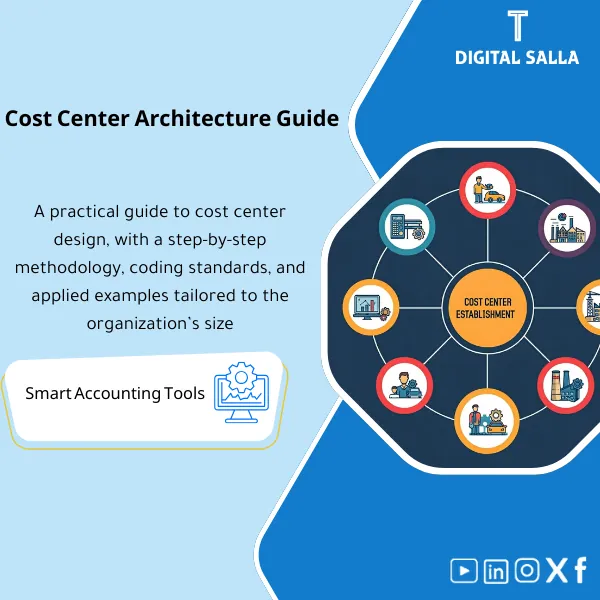
Cost Centers Guide – Practical Steps & Templates
49
How to Design the Right Cost Center Structure: A practical guide for building an effective cost center directory—tailored to executive needs in large, complex organizations. Enhances cost control and supports better decision-making.
Still guessing where your overhead costs actually go every month?
Stop allocating costs blindly. This guide gives you a complete cost center framework — ready-made hierarchy, GL mapping table, overhead allocation templates, and monthly reporting dashboards — so you can trace every dollar back to the department that spent it. Works with any ERP or even plain Excel.
🛡️ 7-Day Guarantee
📊 Editable Word & Excel Files
5 Signs You Need This Cost Centers Guide
1Flat, chaotic chart of accounts: Your cost centers are just a random list with no hierarchy — making it impossible to roll up numbers by group, department, or branch for meaningful reporting.
2Overhead vanishes into a black hole: Shared costs like IT, rent, and admin salaries get dumped into one bucket with no clear allocation basis — so no department owns its true cost.
3Month-end is a scramble: You spend days pulling numbers from different tabs and systems because there is no standard cost center report template to follow.
4ERP setup feels overwhelming: You bought the system but still can’t configure cost centers properly because you don’t have a clear structure to import in the first place.
5Management gets conflicting numbers: Finance says one thing, operations says another — because cost centers are inconsistent across reports and everyone builds their own version.
What You Get
A complete cost center system — hierarchy, mapping, allocation, and reporting — all in editable Word and Excel files:
| Cost Center Hierarchy | A multi-level structure (Company → Division → Department → Sub-department) ready to plug into your chart of accounts or ERP system. |
| GL Mapping Table | A complete mapping between General Ledger accounts and cost centers — so every transaction is automatically tagged to the right department. |
| Overhead Allocation Templates | Ready-made allocation bases (headcount, square meters, usage) with formulas that distribute shared costs fairly and consistently every month. |
| Monthly Reporting Dashboards | Pre-built Excel dashboards showing budget vs. actual by cost center, variance analysis, and trend charts — just paste your numbers. |
| Setup & Policy Guide | A Word document explaining the naming conventions, numbering logic, approval workflow, and governance rules for maintaining cost centers long-term. |
| Implementation Checklist | Step-by-step checklist to roll out cost centers across your organization — from planning to ERP configuration to first monthly close. |
How to Use It in 4 Steps
Map Your Organization
Open the hierarchy template and customize it to match your company’s divisions, departments, and branches. The structure is flexible — add or remove levels as needed.
Link GL Accounts to Cost Centers
Use the GL mapping table to assign every expense account to the correct cost center. This ensures transactions flow to the right department automatically — whether you’re in SAP, Oracle, or Excel.
Set Up Overhead Allocation
Choose the allocation basis for each shared cost (rent by square meters, IT by headcount, etc.) and plug the numbers into the allocation template. The formulas handle the rest.
Run Monthly Reports
Paste your trial balance data into the reporting dashboard each month. You’ll instantly see budget vs. actual, variances, and trends by cost center — ready for management review.
Before vs. After This Guide
| Aspect | ❌ Without | ✅ With This Guide |
|---|---|---|
| Cost Center Structure | Flat list with no grouping or hierarchy | Multi-level hierarchy that rolls up cleanly |
| Overhead Allocation | Dumped into one bucket or split arbitrarily | Fair, documented allocation with clear bases |
| Monthly Reporting | Hours of manual work every close | Paste data → instant dashboard with variances |
| ERP Configuration | Trial and error with no blueprint | Ready-made structure to import directly |
You’re a CFO, financial controller, or management accountant who needs to set up or restructure cost centers. Ideal for mid-size companies, multi-branch operations, or any business preparing for ERP implementation or audit readiness.
You run a solo freelance business with no departments or shared costs to allocate. Or if your company already has a fully mature cost center system with documented policies and automated reporting.
Does this work with my ERP system?
Yes. The hierarchy and GL mapping are ERP-agnostic — they work with SAP, Oracle, Microsoft Dynamics, Odoo, QuickBooks, or even plain Excel. You customize the codes to match your system’s format.
Is this a theoretical guide or a practical toolkit?
100% practical. You get editable templates with real structures, formulas, and dashboards — not a textbook. Customize and use them immediately.
Can I modify the hierarchy to fit my company?
Absolutely. Everything is in editable Word and Excel files. Add departments, rename divisions, change numbering — the structure is designed to be flexible.
What if I need help after purchase?
Email support is included. Full 7-day money-back guarantee if there’s a technical issue. Free lifetime updates — any improvement we add, you get it automatically.
Ready to finally know where every dollar of overhead actually goes?
Save thousands in consulting fees with one ready-to-use toolkit. Set up your cost centers once, report confidently every month.
| الفئات | Financial Structure & Policies |
|---|---|
| Job Title | Accountant |
| Level | Intermediate |
| Format |



Reviews
Clear filtersThere are no reviews yet.